
[et_pb_section bb_built=”1″ fullwidth=”on” specialty=”off” next_background_color=”#000000″][et_pb_fullwidth_slider admin_label=”GSuite Slider” _builder_version=”3.1.1″][et_pb_slide _builder_version=”3.1.1″ heading=”Work flexibility from everywhere on every device” button_link=”#” background_color=”#ffffff” use_background_color_gradient=”off” background_color_gradient_start=”#2b87da” background_color_gradient_end=”#29c4a9″ background_color_gradient_type=”linear” background_color_gradient_direction=”180deg” background_color_gradient_direction_radial=”center” background_color_gradient_start_position=”0%” background_color_gradient_end_position=”100%” background_color_gradient_overlays_image=”off” background_image=”https://velvot.org/wp-content/uploads/2018/06/peopleroundtable.jpg” parallax=”off” parallax_method=”on” background_size=”cover” background_position=”center” background_repeat=”no-repeat” background_blend=”normal” allow_player_pause=”off” background_video_pause_outside_viewport=”on” use_bg_overlay=”on” bg_overlay_color=”rgba(0,0,0,0.51)” use_text_overlay=”off” text_border_radius=”3″ alignment=”center” child_filter_hue_rotate=”0deg” child_filter_saturate=”100%” child_filter_brightness=”100%” child_filter_contrast=”100%” child_filter_invert=”0%” child_filter_sepia=”0%” child_filter_opacity=”100%” child_filter_blur=”0px” child_mix_blend_mode=”normal” background_layout=”dark” text_shadow_style=”none” header_text_align=”center” header_text_shadow_style=”none” body_text_align=”center” body_text_shadow_style=”none” custom_button=”off” button_bg_use_color_gradient=”off” button_bg_color_gradient_overlays_image=”off” button_use_icon=”on” button_on_hover=”on” button_alignment=”center” button_text_shadow_style=”none” box_shadow_style_button=”none” /][/et_pb_fullwidth_slider][/et_pb_section][et_pb_section bb_built=”1″ fullwidth=”on” specialty=”off” prev_background_color=”#000000″ next_background_color=”#d9dfe2″][et_pb_fullwidth_header _builder_version=”3.1.1″ title=”G-Suite” text_orientation=”center” title_font=”|600|||||||” title_text_align=”center” content_text_align=”center”]
Organization, strategy, and teamwork are key to running any successful venture. G Suite is a cloud-based productivity suite that empowers your company to work effectively and collaboratively in the digital world in order to thrive in your industry. Using this user-friendly, cost-effective set of applications, your team can work together to build and cultivate your business from anywhere, on any device.
[/et_pb_fullwidth_header][/et_pb_section][et_pb_section bb_built=”1″ admin_label=”section” background_color=”#d9dfe2″ prev_background_color=”#ffffff” next_background_color=”#ffffff” _builder_version=”3.1.1″ custom_margin=”-40px||-80px|”][et_pb_row admin_label=”row” background_position=”top_left” background_repeat=”repeat” background_size=”initial”][et_pb_column type=”4_4″][et_pb_text _builder_version=”3.1.1″ text_orientation=”center” module_alignment=”center” max_width=”65%” max_width_tablet=”80%” max_width_phone=”100%” max_width_last_edited=”on|phone”]
Connect
Communicate with your colleagues wherever they are and work together as a team. Keep everyone be in the know.
[/et_pb_text][et_pb_code admin_label=”JS – jQuery code – move this into Divi Theme options Integration Tab or custom js file” _builder_version=”3.1.1″]<script><!– [et_pb_line_break_holder] –>jQuery(document).ready(function($) {<!– [et_pb_line_break_holder] –><!– [et_pb_line_break_holder] –> /* Blurbs as Tabs */<!– [et_pb_line_break_holder] –> <!– [et_pb_line_break_holder] –> $(‘.tab-title’).each(function () { <!– [et_pb_line_break_holder] –> <!– [et_pb_line_break_holder] –> var section_id = $(this).find(“a”).attr(“href”);<!– [et_pb_line_break_holder] –> $(this).find(“a”).removeAttr(“href”);<!– [et_pb_line_break_holder] –> <!– [et_pb_line_break_holder] –> $(this).click(function() {<!– [et_pb_line_break_holder] –> <!– [et_pb_line_break_holder] –> $(this).siblings().removeClass(“active-tab”);<!– [et_pb_line_break_holder] –> $(this).addClass(“active-tab”);<!– [et_pb_line_break_holder] –> $(‘.tab-content’).hide();<!– [et_pb_line_break_holder] –> $(section_id).show();<!– [et_pb_line_break_holder] –>$(‘html, body’).animate({scrollTop: $(section_id).offset().top}, 1000);<!– [et_pb_line_break_holder] –> });<!– [et_pb_line_break_holder] –> <!– [et_pb_line_break_holder] –> });<!– [et_pb_line_break_holder] –><!– [et_pb_line_break_holder] –>});<!– [et_pb_line_break_holder] –></script>[/et_pb_code][et_pb_code admin_label=”CSS Styles – move the code within the ‹script› tag into the stylesheet” _builder_version=”3.1.1″]<style><!– [et_pb_line_break_holder] –>/* ——————————————– <!– [et_pb_line_break_holder] –> —— Blurbs as Tabs Custom Styling ——<!– [et_pb_line_break_holder] –> ——————————————– */<!– [et_pb_line_break_holder] –><!– [et_pb_line_break_holder] –>/* Style the Blurbs Tabs */<!– [et_pb_line_break_holder] –>#blurb-tabs .et_pb_column {<!– [et_pb_line_break_holder] –> display:flex;<!– [et_pb_line_break_holder] –> align-items:center;<!– [et_pb_line_break_holder] –> justify-content:center;<!– [et_pb_line_break_holder] –> flex-wrap:wrap;<!– [et_pb_line_break_holder] –>}<!– [et_pb_line_break_holder] –>#blurb-tabs .tab-title {<!– [et_pb_line_break_holder] –> width:16.6%;<!– [et_pb_line_break_holder] –>}<!– [et_pb_line_break_holder] –><!– [et_pb_line_break_holder] –>/* Hover Styles for Blurb Tabs – Titles */<!– [et_pb_line_break_holder] –>#blurb-tabs .tab-title {<!– [et_pb_line_break_holder] –> transition:all .3s ease-in-out;<!– [et_pb_line_break_holder] –>}<!– [et_pb_line_break_holder] –>#blurb-tabs .tab-title:hover {<!– [et_pb_line_break_holder] –> cursor:pointer; <!– [et_pb_line_break_holder] –> background:#222; /* Tab hover background color */<!– [et_pb_line_break_holder] –>}<!– [et_pb_line_break_holder] –>#blurb-tabs .tab-title.active-tab {<!– [et_pb_line_break_holder] –> background:#D9DFE2; /* Active tab background color */<!– [et_pb_line_break_holder] –>}<!– [et_pb_line_break_holder] –>#blurb-tabs .tab-title.active-tab .et_pb_blurb_container h4 a {<!– [et_pb_line_break_holder] –> color:#000; /* Active tab title color */<!– [et_pb_line_break_holder] –>}<!– [et_pb_line_break_holder] –>#blurb-tabs .tab-title.active-tab .et-pb-icon {<!– [et_pb_line_break_holder] –> color:#666!important; /* Active tab icon color */<!– [et_pb_line_break_holder] –>}<!– [et_pb_line_break_holder] –><!– [et_pb_line_break_holder] –>/* Tab Titles Mobile Styles */<!– [et_pb_line_break_holder] –>@media (max-width: 767px ) {<!– [et_pb_line_break_holder] –> #blurb-tabs .tab-title {<!– [et_pb_line_break_holder] –> width:50%;<!– [et_pb_line_break_holder] –> }<!– [et_pb_line_break_holder] –> #blurb-tabs .tab-title .et_pb_main_blurb_image {<!– [et_pb_line_break_holder] –> margin-bottom:10px; /* Reduce icon bottom margin */<!– [et_pb_line_break_holder] –> }<!– [et_pb_line_break_holder] –>}<!– [et_pb_line_break_holder] –><!– [et_pb_line_break_holder] –>@media (max-width: 479px ) {<!– [et_pb_line_break_holder] –> #blurb-tabs .tab-title {<!– [et_pb_line_break_holder] –> width:100%;<!– [et_pb_line_break_holder] –> }<!– [et_pb_line_break_holder] –> #blurb-tabs .tab-title .et_pb_blurb_content { /* This moves icon to the right */<!– [et_pb_line_break_holder] –> display:flex;<!– [et_pb_line_break_holder] –> align-items:center;<!– [et_pb_line_break_holder] –> justify-content:flex-start;<!– [et_pb_line_break_holder] –> }<!– [et_pb_line_break_holder] –> #blurb-tabs .tab-title .et_pb_main_blurb_image { /* Fix icon margins on mobile */<!– [et_pb_line_break_holder] –> margin-bottom:0;<!– [et_pb_line_break_holder] –> margin-right:30px;<!– [et_pb_line_break_holder] –> }<!– [et_pb_line_break_holder] –>}<!– [et_pb_line_break_holder] –><!– [et_pb_line_break_holder] –>/* Hide the tabs content/sections */<!– [et_pb_line_break_holder] –>.tab-content {<!– [et_pb_line_break_holder] –> display:none;<!– [et_pb_line_break_holder] –>}<!– [et_pb_line_break_holder] –></style>[/et_pb_code][/et_pb_column][/et_pb_row][/et_pb_section][et_pb_section bb_built=”1″ specialty=”off” _builder_version=”3.1.1″ custom_padding=”0px|0px|0px|0px” module_id=”blurb-tabs” prev_background_color=”#d9dfe2″ next_background_color=”#d9dfe2″ custom_margin=”-60px|||”][et_pb_row background_position=”top_left” background_repeat=”repeat” background_size=”initial” _builder_version=”3.0.75″ background_position_1=”top_left” background_repeat_1=”no-repeat” make_fullwidth=”on” use_custom_gutter=”on” gutter_width=”1″ custom_padding=”0px||0px|”][et_pb_column type=”4_4″][et_pb_blurb admin_label=”Blurb %22Gmail%22″ _builder_version=”3.1.1″ title=”Gmail” url=”#tab1″ use_icon=”on” font_icon=”%%109%%” icon_color=”#e02b20″ use_icon_font_size=”on” text_orientation=”center” module_class=”tab-title” custom_padding=”40px|40px|40px|40px” icon_font_size=”70px” header_font_size=”24″ header_font_size_phone=”20″ header_font_size_last_edited=”on|phone” custom_padding_last_edited=”on|phone” animation_style=”flip” custom_padding_tablet=”20px|20px|20px|20px” custom_padding_phone=”10px|20px|10px|20px” animation_duration=”500ms” max_width_tablet=”50px” icon_font_size_last_edited=”on|phone” icon_font_size_tablet=”50px” icon_font_size_phone=”30px” header_text_align=”center” body_text_align=”center” /][et_pb_blurb admin_label=”Blurb %22Calender%22″ _builder_version=”3.1.1″ title=”Calender” url=”#tab2″ use_icon=”on” font_icon=”%%370%%” icon_color=”#0c71c3″ use_icon_font_size=”on” text_orientation=”center” module_class=”tab-title” custom_padding=”40px|40px|40px|40px” icon_font_size=”70px” header_font_size=”24″ header_font_size_phone=”20″ header_font_size_last_edited=”on|phone” custom_padding_last_edited=”on|phone” animation_style=”flip” custom_padding_tablet=”20px|20px|20px|20px” custom_padding_phone=”10px|20px|10px|20px” animation_duration=”500ms” max_width_tablet=”50px” icon_font_size_last_edited=”on|phone” icon_font_size_tablet=”50px” icon_font_size_phone=”30px” body_text_align=”center” /][et_pb_blurb admin_label=”Blurb %22Google+%22″ _builder_version=”3.1.1″ title=”Google+” url=”#tab3″ use_icon=”on” font_icon=”%%294%%” icon_color=”#e02b20″ use_icon_font_size=”on” text_orientation=”center” module_class=”tab-title” custom_padding=”40px|40px|40px|40px” icon_font_size=”70px” header_font_size=”24″ header_font_size_phone=”20″ header_font_size_last_edited=”on|phone” custom_padding_last_edited=”on|phone” animation_style=”flip” animation_delay=”200ms” custom_padding_tablet=”20px|20px|20px|20px” custom_padding_phone=”10px|20px|10px|20px” animation_duration=”500ms” icon_font_size_tablet=”50px” icon_font_size_phone=”30px” icon_font_size_last_edited=”on|phone” max_width_tablet=”50px” header_text_align=”center” body_text_align=”center” /][et_pb_blurb admin_label=”Blurb %22Hangouts Chat%22″ _builder_version=”3.1.1″ title=”Chats” url=”#tab4″ use_icon=”on” font_icon=”%%222%%” icon_color=”#1eb596″ use_icon_font_size=”on” text_orientation=”center” module_class=”tab-title” custom_padding=”40px|40px|40px|40px” icon_font_size=”70px” header_font_size=”24″ header_font_size_phone=”20″ header_font_size_last_edited=”on|phone” custom_padding_last_edited=”on|phone” animation_style=”flip” animation_delay=”400ms” custom_padding_tablet=”20px|20px|20px|20px” custom_padding_phone=”10px|20px|10px|20px” animation_duration=”500ms” icon_font_size_tablet=”50px” icon_font_size_phone=”30px” icon_font_size_last_edited=”on|phone” max_width_tablet=”50px” header_text_align=”center” body_text_align=”center” /][et_pb_blurb admin_label=”Blurb %22Hangouts Meet%22″ _builder_version=”3.1.1″ title=”Hangouts Meet” url=”#tab5″ use_icon=”on” font_icon=”%%305%%” icon_color=”#1eb596″ use_icon_font_size=”on” text_orientation=”center” module_class=”tab-title” custom_padding=”40px|40px|40px|40px” icon_font_size=”70px” header_font_size=”24″ header_font_size_phone=”20″ header_font_size_last_edited=”on|phone” custom_padding_last_edited=”on|desktop” animation_style=”flip” animation_delay=”600ms” custom_padding_phone=”10px|20px|10px|20px” custom_padding_tablet=”20px|20px|20px|20px” animation_duration=”500ms” icon_font_size_tablet=”50px” icon_font_size_phone=”30px” icon_font_size_last_edited=”on|phone” max_width_tablet=”50px” header_text_align=”center” body_text_align=”center” /][et_pb_blurb admin_label=”Blurb %22Hardware%22″ _builder_version=”3.1.1″ title=”Meet Hardware” url=”#tab6″ use_icon=”on” font_icon=”%%205%%” icon_color=”#1eb596″ use_icon_font_size=”on” text_orientation=”center” module_class=”tab-title” custom_padding=”40px|40px|40px|40px” icon_font_size=”70px” header_font_size=”24″ header_font_size_phone=”20″ header_font_size_last_edited=”on|phone” custom_padding_last_edited=”on|desktop” animation_style=”flip” animation_delay=”600ms” custom_padding_phone=”10px|20px|10px|20px” custom_padding_tablet=”20px|20px|20px|20px” animation_duration=”500ms” icon_font_size_tablet=”50px” icon_font_size_phone=”30px” icon_font_size_last_edited=”on|phone” max_width_tablet=”50px” header_text_align=”center” body_text_align=”center” /][/et_pb_column][/et_pb_row][/et_pb_section][et_pb_section bb_built=”1″ fullwidth=”off” specialty=”off” _builder_version=”3.0.75″ module_id=”tab1″ module_class=”tab-content” background_color=”#d9dfe2″ prev_background_color=”#ffffff” next_background_color=”#000000″][et_pb_row background_position=”top_left” background_repeat=”repeat” background_size=”initial”][et_pb_column type=”1_3″][et_pb_image _builder_version=”3.1.1″ src=”https://velvot.org/wp-content/uploads/2018/06/gmail.png” animation_style=”slide” animation_duration=”500ms” animation_intensity_slide=”10%” animation_direction=”left” /][/et_pb_column][et_pb_column type=”2_3″][et_pb_toggle _builder_version=”3.1.1″ title=”Email for your business” open=”on” title_font=”|600|||||||”]
Gmail keeps you updated with real-time message notifications, and safely stores your important emails and data. IT admins can centrally manage accounts across your organization and devices.
[/et_pb_toggle][et_pb_toggle _builder_version=”3.1.1″ title=”Get custom email” title_font=”|600|||||||”]
Build customer trust by giving everyone in your company a professional email address at your domain, like susan@yourcompany and joe@yourcompany. Also create group mailing lists, like sales@yourcompany.
[/et_pb_toggle][et_pb_toggle _builder_version=”3.1.1″ title=”Work without interruption” title_font=”|600|||||||”]
Access your email anytime, anywhere, on any device—no Internet connection needed. Read and draft messages without connectivity, and they’ll be ready to send when you’re back online.
[/et_pb_toggle][et_pb_toggle _builder_version=”3.1.1″ title=”Conversations with chat and video” title_font=”|600|||||||”]
For those moments when you need more than just email, join a Hangouts Meet video call or chat with a colleague directly from your inbox.
[/et_pb_toggle][/et_pb_column][/et_pb_row][/et_pb_section][et_pb_section bb_built=”1″ fullwidth=”off” specialty=”off” _builder_version=”3.0.73″ module_id=”tab2″ module_class=”tab-content” background_color=”#d9dfe2″ prev_background_color=”#000000″ next_background_color=”#000000″][et_pb_row background_position=”top_left” background_repeat=”repeat” background_size=”initial”][et_pb_column type=”1_3″][et_pb_image _builder_version=”3.1.1″ src=”https://velvot.org/wp-content/uploads/2018/06/calender-1.jpg” animation_style=”slide” animation_duration=”500ms” animation_intensity_slide=”10%” animation_direction=”left” /][/et_pb_column][et_pb_column type=”2_3″][et_pb_text _builder_version=”3.1.1″]
Calendar
[/et_pb_text][et_pb_toggle _builder_version=”3.1.1″ title=”Integrated online calendars designed for teams” open=”on”]
- Spend less time planning and more time doing with shareable calendars that integrate seamlessly with Gmail, Drive, Contacts, Sites and Hangouts so you always know what’s next.
[/et_pb_toggle][et_pb_toggle _builder_version=”3.1.1″ title=”Smart scheduling for meetings”]
Schedule events quickly by checking coworkers’ availability or layering their calendars in a single view. You can share calendars so people see full event details or just if you are free.
[/et_pb_toggle][et_pb_toggle _builder_version=”3.1.1″ title=”Access from your laptop, tablet or phone”]
View and edit your schedule from your phone or tablet. Use our optimized mobile apps or sync with your phone’s built-in calendar.
[/et_pb_toggle][/et_pb_column][/et_pb_row][/et_pb_section][et_pb_section bb_built=”1″ specialty=”off” _builder_version=”3.1.1″ module_id=”tab3″ module_class=”tab-content” background_color=”#d9dfe2″ prev_background_color=”#000000″ next_background_color=”#000000″][et_pb_row background_position=”top_left” background_repeat=”repeat” background_size=”initial”][et_pb_column type=”1_3″][et_pb_image _builder_version=”3.1.1″ src=”https://velvot.org/wp-content/uploads/2018/06/Google_plus.png” animation_style=”slide” animation_duration=”500ms” animation_intensity_slide=”10%” animation_direction=”left” /][/et_pb_column][et_pb_column type=”2_3″][et_pb_text _builder_version=”3.1.1″ animation_style=”fold” animation_direction=”left” module_alignment=”left”]
Google+
[/et_pb_text][et_pb_toggle _builder_version=”3.1.1″ title=”Engage with coworkers on a secure corporate social network” open=”on”]
Create an online community where your employees can safely share team updates, new ideas, and common interests in real time.
[/et_pb_toggle][et_pb_toggle _builder_version=”3.1.1″ title=”Share knowledge and ideas in your team’s forum”]
With posts, comments, and communities, Google+ makes it easy to stay in the loop, and exchange ideas with your team.
[/et_pb_toggle][et_pb_toggle _builder_version=”3.1.1″ title=”Connect with team members no matter where they are”]
Even remote workers and deskless colleagues can stay plugged into the latest company updates and conversations with powerful Android and iOS apps.
[/et_pb_toggle][/et_pb_column][/et_pb_row][/et_pb_section][et_pb_section bb_built=”1″ specialty=”off” _builder_version=”3.1.1″ module_id=”tab4″ module_class=”tab-content” background_color=”#d9dfe2″ prev_background_color=”#000000″ next_background_color=”#000000″][et_pb_row background_position=”top_left” background_repeat=”repeat” background_size=”initial”][et_pb_column type=”1_3″][et_pb_image _builder_version=”3.1.1″ src=”https://velvot.org/wp-content/uploads/2018/06/chat.jpg” animation_style=”slide” animation_duration=”500ms” animation_intensity_slide=”10%” animation_direction=”left” /][/et_pb_column][et_pb_column type=”2_3″][et_pb_text _builder_version=”3.1.1″]
Hangouts Chat
[/et_pb_text][et_pb_toggle _builder_version=”3.1.1″ title=”A messaging platform built for teams” open=”on”]
Whether in a 1:1 chat or a dedicated group workspace, Hangouts Chat makes it easy to collaborate with your team in an organized way. Share and discuss Docs, Sheets, and Slides all in one place.
[/et_pb_toggle][et_pb_toggle _builder_version=”3.1.1″ title=”Work seamlessly with other apps”]
Schedule meetings, create tasks, or get updates from your team right within Chat. In addition to useful integrations with G Suite apps, Chat connects to several third-party tools, helping you manage all of your work in one place.
[/et_pb_toggle][et_pb_toggle _builder_version=”3.1.1″ title=”Securely message your team from any device”]
Chat is built with leading enterprise-grade security including mobile device management, single-sign-on, two-factor authentication, admin settings, compliance, and Vault retention, holds, search & export.
[/et_pb_toggle][/et_pb_column][/et_pb_row][/et_pb_section][et_pb_section bb_built=”1″ specialty=”off” _builder_version=”3.1.1″ module_id=”tab5″ module_class=”tab-content” background_color=”#d9dfe2″ prev_background_color=”#000000″ next_background_color=”#000000″][et_pb_row background_position=”top_left” background_repeat=”repeat” background_size=”initial”][et_pb_column type=”1_3″][et_pb_image _builder_version=”3.1.1″ src=”https://velvot.org/wp-content/uploads/2018/06/meet.jpg” animation_style=”slide” animation_duration=”500ms” animation_intensity_slide=”10%” animation_direction=”left” /][/et_pb_column][et_pb_column type=”2_3″][et_pb_text _builder_version=”3.1.1″ animation_style=”fold” animation_direction=”left” module_alignment=”left”]
Hangouts Meet
[/et_pb_text][et_pb_toggle _builder_version=”3.1.1″ title=”Video meetings for your business.” open=”on”]
Connect with your team from anywhere. With easy-to-join video calls, you can meet face to face without the added cost of travel.
[/et_pb_toggle][et_pb_toggle _builder_version=”3.1.1″ title=”Enjoy frictionless meetings.”]
Meet takes the headaches out of joining a video call at work. Just set up a meeting and share a link. No worrying about whether teammates, clients, or customers have the right accounts or plug-ins. With a fast, lightweight interface and smart participant management, multi-person video calls are a breeze.
[/et_pb_toggle][et_pb_toggle _builder_version=”3.1.1″ title=”Designed for every kind of business.”]
Meet is fully integrated with G Suite, so you can join meetings directly from a Calendar event or email invite. All of the important event details are right there when you need them, whether you’re joining from a computer, phone, or conference room.
[/et_pb_toggle][et_pb_toggle _builder_version=”3.1.1″ title=”Join meetings on the go.”]
With Meet’s specially designed iOS and Android apps, you can see your meetings for the day with all the important information from Calendar, then join with a tap. G Suite’s Enterprise edition also creates a dial-in phone number for each meeting, so every guest has a great experience – even on the road without wifi or data.
[/et_pb_toggle][/et_pb_column][/et_pb_row][/et_pb_section][et_pb_section bb_built=”1″ specialty=”off” _builder_version=”3.1.1″ module_id=”tab6″ module_class=”tab-content” background_color=”#d9dfe2″ prev_background_color=”#000000″ next_background_color=”#ffffff”][et_pb_row background_position=”top_left” background_repeat=”repeat” background_size=”initial”][et_pb_column type=”1_3″][et_pb_image _builder_version=”3.1.1″ src=”https://velvot.org/wp-content/uploads/2018/06/meet.jpg” animation_style=”slide” animation_duration=”500ms” animation_intensity_slide=”10%” animation_direction=”left” /][/et_pb_column][et_pb_column type=”2_3″][et_pb_text _builder_version=”3.1.1″ animation_style=”fold” animation_direction=”left” module_alignment=”left”]
Hangouts Meet hardware
[/et_pb_text][et_pb_toggle _builder_version=”3.1.1″ title=”Makes meetings easier” open=”on”]
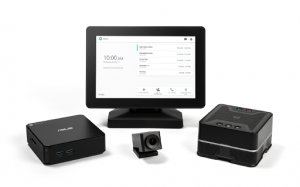
Hangouts Meet hardware brings the same reliable, easy-to-join video meeting experience of Hangouts Meet to the conference room. Its curated set of components work together end-to-end to make engaging HD meetings affordable and headache-free.
[/et_pb_toggle][et_pb_toggle _builder_version=”3.1.1″ title=”For every conference room”]
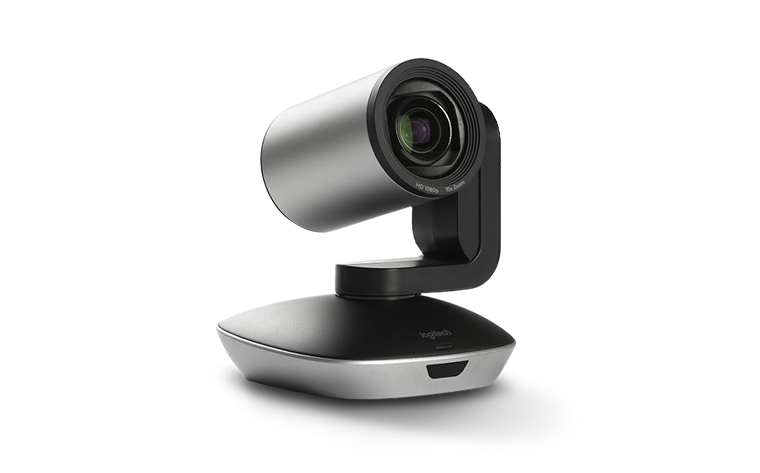
Meet hardware scales to any size conference room. Shine in huddle rooms with a wide-field-of-view camera. Or, expand to larger rooms with the optical zoom of a mechanical pan-tilt-zoom camera. Daisy chain multiple speakermics together with a single cable for high quality audio across any size table.
[/et_pb_toggle][et_pb_toggle _builder_version=”3.1.1″ title=”Designed with intelligence”]
The speakermic, custom designed and built by Google, intelligently reduces echoes and actively manages background noise to deliver rich, immersive, crystal-clear 360˚ sound. In huddle rooms, Meet hardware can automatically zoom and crop based on the number of people in the room.
[/et_pb_toggle][et_pb_toggle _builder_version=”3.1.1″ title=”Easy to set up, easy to manage”]
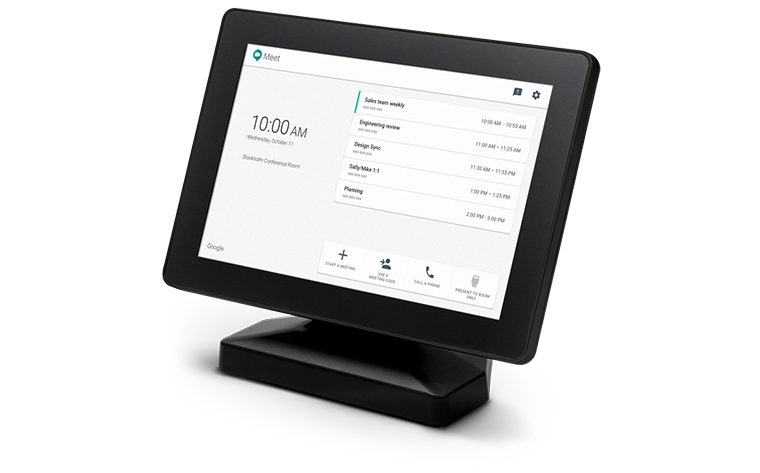
In just minutes, you can set up Hangouts Meet hardware and connect with your team, whether they’re on another floor or in another country. The hardware kit can even self-diagnose any issues, and it automatically updates the firmware of all the components to the latest version to guarantee the best video experience, always. Remote device monitoring and management make it easy for administrators to stay in control, too.
[/et_pb_toggle][/et_pb_column][/et_pb_row][/et_pb_section][et_pb_section bb_built=”1″ fullwidth=”off” specialty=”off” prev_background_color=”#d9dfe2″ next_background_color=”#000000″][et_pb_row][et_pb_column type=”4_4″][et_pb_text _builder_version=”3.1.1″ text_orientation=”center” module_alignment=”center” max_width=”65%” max_width_tablet=”80%” max_width_phone=”100%” max_width_last_edited=”on|phone”]
Create
Create everything you need to bring your project to life.
[/et_pb_text][/et_pb_column][/et_pb_row][/et_pb_section][et_pb_section bb_built=”1″ specialty=”off” _builder_version=”3.1.1″ custom_padding=”0px|0px|0px|0px” module_id=”blurb-tabs” prev_background_color=”#000000″ custom_margin=”-60px|||” next_background_color=”#d9dfe2″][et_pb_row background_position=”top_left” background_repeat=”repeat” background_size=”initial” _builder_version=”3.0.75″ background_position_1=”top_left” background_repeat_1=”no-repeat” make_fullwidth=”on” use_custom_gutter=”on” gutter_width=”1″ custom_padding=”0px||0px|”][et_pb_column type=”4_4″][et_pb_blurb admin_label=”Blurb %22Docs%22″ _builder_version=”3.1.1″ title=”Docs” url=”#tab11″ use_icon=”on” font_icon=”%%208%%” icon_color=”#0c71c3″ use_icon_font_size=”on” text_orientation=”center” module_class=”tab-title” custom_padding=”40px|40px|40px|40px” icon_font_size=”70px” header_font_size=”24″ header_font_size_phone=”20″ header_font_size_last_edited=”on|phone” custom_padding_last_edited=”on|phone” animation_style=”flip” custom_padding_tablet=”20px|20px|20px|20px” custom_padding_phone=”10px|20px|10px|20px” animation_duration=”500ms” max_width_tablet=”50px” icon_font_size_last_edited=”on|phone” icon_font_size_tablet=”50px” icon_font_size_phone=”30px” header_text_align=”center” body_text_align=”center” /][et_pb_blurb admin_label=”Blurb %22Sheets%22″ _builder_version=”3.1.1″ title=”Sheets” url=”#tab12″ use_icon=”on” font_icon=”%%72%%” icon_color=”#21b51e” use_icon_font_size=”on” text_orientation=”center” module_class=”tab-title” custom_padding=”40px|40px|40px|40px” icon_font_size=”70px” header_font_size=”24″ header_font_size_phone=”20″ header_font_size_last_edited=”on|phone” custom_padding_last_edited=”on|phone” animation_style=”flip” custom_padding_tablet=”20px|20px|20px|20px” custom_padding_phone=”10px|20px|10px|20px” animation_duration=”500ms” max_width_tablet=”50px” icon_font_size_last_edited=”on|phone” icon_font_size_tablet=”50px” icon_font_size_phone=”30px” body_text_align=”center” /][et_pb_blurb admin_label=”Blurb %22Forms%22″ _builder_version=”3.1.1″ title=”Forms” url=”#tab13″ use_icon=”on” font_icon=”%%65%%” icon_color=”#8300e9″ use_icon_font_size=”on” text_orientation=”center” module_class=”tab-title” custom_padding=”40px|40px|40px|40px” icon_font_size=”70px” header_font_size=”24″ header_font_size_phone=”20″ header_font_size_last_edited=”on|phone” custom_padding_last_edited=”on|phone” animation_style=”flip” animation_delay=”200ms” custom_padding_tablet=”20px|20px|20px|20px” custom_padding_phone=”10px|20px|10px|20px” animation_duration=”500ms” icon_font_size_tablet=”50px” icon_font_size_phone=”30px” icon_font_size_last_edited=”on|phone” max_width_tablet=”50px” header_text_align=”center” body_text_align=”center” /][et_pb_blurb admin_label=”Blurb %22Slides%22″ _builder_version=”3.1.1″ title=”Slides” url=”#tab14″ use_icon=”on” font_icon=”%%127%%” icon_color=”#eacf00″ use_icon_font_size=”on” text_orientation=”center” module_class=”tab-title” custom_padding=”40px|40px|40px|40px” icon_font_size=”70px” header_font_size=”24″ header_font_size_phone=”20″ header_font_size_last_edited=”on|phone” custom_padding_last_edited=”on|phone” animation_style=”flip” animation_delay=”400ms” custom_padding_tablet=”20px|20px|20px|20px” custom_padding_phone=”10px|20px|10px|20px” animation_duration=”500ms” icon_font_size_tablet=”50px” icon_font_size_phone=”30px” icon_font_size_last_edited=”on|phone” max_width_tablet=”50px” header_text_align=”center” body_text_align=”center” /][et_pb_blurb admin_label=”Blurb %22Sites%22″ _builder_version=”3.1.1″ title=”Sites” url=”#tab15″ use_icon=”on” font_icon=”%%66%%” icon_color=”#5c00e8″ use_icon_font_size=”on” text_orientation=”center” module_class=”tab-title” custom_padding=”40px|40px|40px|40px” icon_font_size=”70px” header_font_size=”24″ header_font_size_phone=”20″ header_font_size_last_edited=”on|phone” custom_padding_last_edited=”on|desktop” animation_style=”flip” animation_delay=”600ms” custom_padding_phone=”10px|20px|10px|20px” custom_padding_tablet=”20px|20px|20px|20px” animation_duration=”500ms” icon_font_size_tablet=”50px” icon_font_size_phone=”30px” icon_font_size_last_edited=”on|phone” max_width_tablet=”50px” header_text_align=”center” body_text_align=”center” /][et_pb_blurb admin_label=”Blurb %22App Maker%22″ _builder_version=”3.1.1″ title=”App Maker” url=”#tab16″ use_icon=”on” font_icon=”%%304%%” icon_color=”#f46e00″ use_icon_font_size=”on” text_orientation=”center” module_class=”tab-title” custom_padding=”40px|40px|40px|40px” icon_font_size=”70px” header_font_size=”24″ header_font_size_phone=”20″ header_font_size_last_edited=”on|phone” custom_padding_last_edited=”on|desktop” animation_style=”flip” animation_delay=”600ms” custom_padding_phone=”10px|20px|10px|20px” custom_padding_tablet=”20px|20px|20px|20px” animation_duration=”500ms” icon_font_size_tablet=”50px” icon_font_size_phone=”30px” icon_font_size_last_edited=”on|phone” max_width_tablet=”50px” header_text_align=”center” body_text_align=”center” /][et_pb_blurb admin_label=”Blurb %22Keep%22″ _builder_version=”3.1.1″ title=”Keep” url=”#tab17″ use_icon=”on” font_icon=”%%234%%” icon_color=”#edf000″ use_icon_font_size=”on” text_orientation=”center” module_class=”tab-title” custom_padding=”40px|40px|40px|40px” icon_font_size=”70px” header_font_size=”24″ header_font_size_phone=”20″ header_font_size_last_edited=”on|phone” custom_padding_last_edited=”on|desktop” animation_style=”flip” animation_delay=”600ms” custom_padding_phone=”10px|20px|10px|20px” custom_padding_tablet=”20px|20px|20px|20px” animation_duration=”500ms” icon_font_size_tablet=”50px” icon_font_size_phone=”30px” icon_font_size_last_edited=”on|phone” max_width_tablet=”50px” header_text_align=”center” body_text_align=”center” /][et_pb_blurb admin_label=”Blurb %22Jamboard%22″ _builder_version=”3.1.1″ title=”Jamboard” url=”#tab18″ use_icon=”on” font_icon=”%%240%%” icon_color=”#d17300″ use_icon_font_size=”on” text_orientation=”center” module_class=”tab-title” custom_padding=”40px|40px|40px|40px” icon_font_size=”70px” header_font_size=”24″ header_font_size_phone=”20″ header_font_size_last_edited=”on|phone” custom_padding_last_edited=”on|desktop” animation_style=”flip” animation_delay=”600ms” custom_padding_phone=”10px|20px|10px|20px” custom_padding_tablet=”20px|20px|20px|20px” animation_duration=”500ms” icon_font_size_tablet=”50px” icon_font_size_phone=”30px” icon_font_size_last_edited=”on|phone” max_width_tablet=”50px” header_text_align=”center” body_text_align=”center” /][/et_pb_column][/et_pb_row][/et_pb_section][et_pb_section bb_built=”1″ specialty=”off” _builder_version=”3.1.1″ module_id=”tab11″ module_class=”tab-content” background_color=”#d9dfe2″ prev_background_color=”#ffffff” next_background_color=”#000000″][et_pb_row background_position=”top_left” background_repeat=”repeat” background_size=”initial”][et_pb_column type=”1_3″][et_pb_image _builder_version=”3.1.1″ src=”https://velvot.org/wp-content/uploads/2018/06/Googledocslogo.png” animation_style=”slide” animation_duration=”500ms” animation_intensity_slide=”10%” animation_direction=”left” /][/et_pb_column][et_pb_column type=”2_3″][et_pb_text _builder_version=”3.1.1″ animation_style=”fold” animation_direction=”left” module_alignment=”left”]
Google Docs
[/et_pb_text][et_pb_toggle _builder_version=”3.1.1″ title=”Word processing for teams” open=”on”]
Create and edit text documents right in your browser—no dedicated software required. Multiple people can work at the same time, and every change is saved automatically.
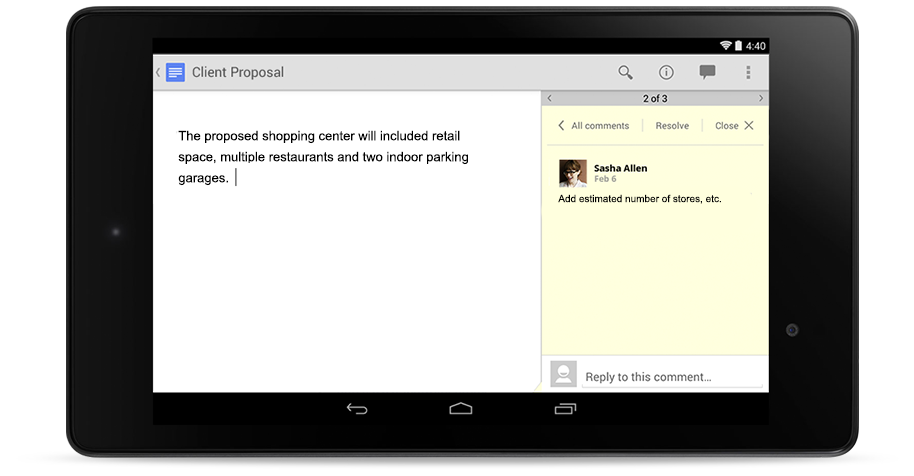
[/et_pb_toggle][et_pb_toggle _builder_version=”3.1.1″ title=”Commenting, chat and real-time editing”]
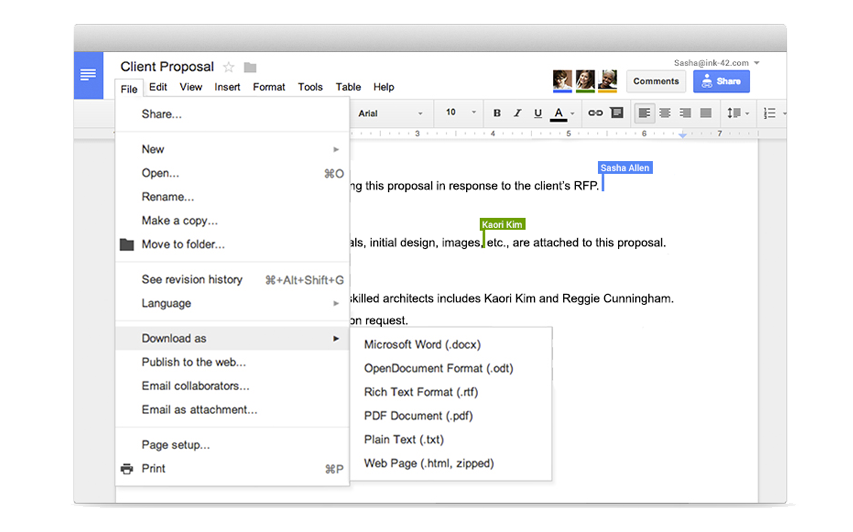
Work in a single document with teammates or people outside your company. See edits as others type, communicate through built-in chat and ask questions through including comments.
[/et_pb_toggle][et_pb_toggle _builder_version=”3.1.1″ title=”Works with all popular file types”]
Import your documents to make them instantly editable, including Microsoft® Word and PDF files. Export your work in .docx, .pdf, .odt, .rtf, .txt or .html format.
[/et_pb_toggle][et_pb_toggle _builder_version=”3.1.1″ title=”Unlimited revision history”]
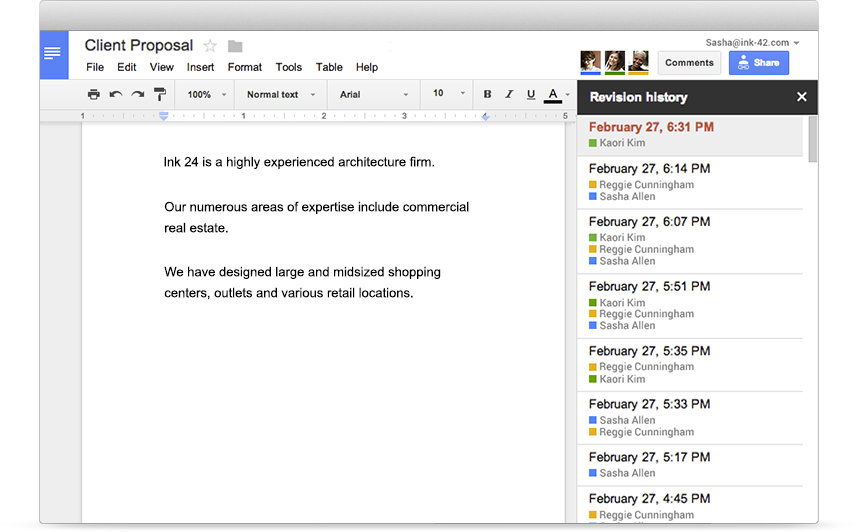
Track changes made to your documents and undo anything you choose. Previous versions are kept indefinitely and they don’t count toward your storage.
[/et_pb_toggle][/et_pb_column][/et_pb_row][/et_pb_section][et_pb_section bb_built=”1″ specialty=”off” _builder_version=”3.1.1″ module_id=”tab12″ module_class=”tab-content” background_color=”#d9dfe2″ prev_background_color=”#000000″ next_background_color=”#000000″][et_pb_row background_position=”top_left” background_repeat=”repeat” background_size=”initial”][et_pb_column type=”1_3″][et_pb_image _builder_version=”3.1.1″ src=”https://velvot.org/wp-content/uploads/2018/06/sheets.png” animation_style=”slide” animation_duration=”500ms” animation_intensity_slide=”10%” animation_direction=”left” /][/et_pb_column][et_pb_column type=”2_3″][et_pb_text _builder_version=”3.1.1″ animation_style=”fold” animation_direction=”left” module_alignment=”left”]
Sheets
[/et_pb_text][et_pb_toggle _builder_version=”3.1.1″ title=”Collaborate on data analysis with smart spreadsheets” open=”on”]
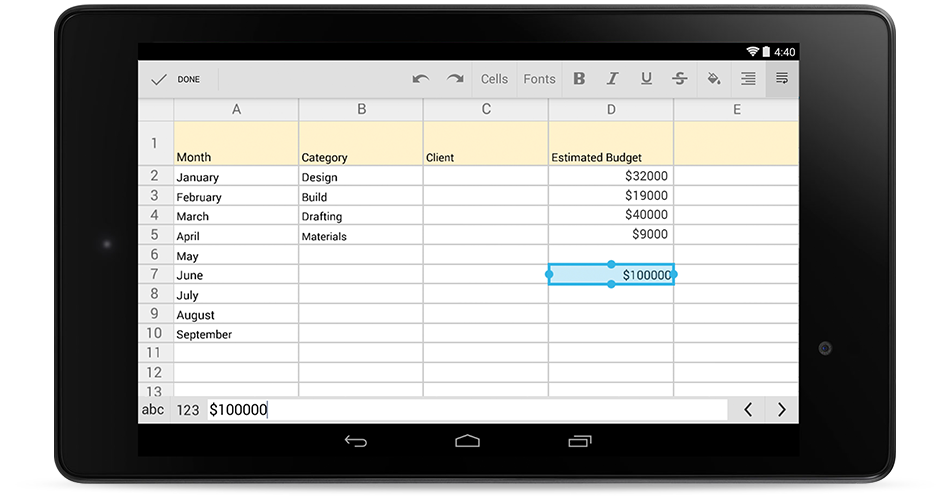
Work directly with team members in the same spreadsheet at the same time. Perform calculations with formulas ranging from simple to sophisticated. All changes are automatically saved as you type.
[/et_pb_toggle][et_pb_toggle _builder_version=”3.1.1″ title=”Crunch data easily with powerful functions”]
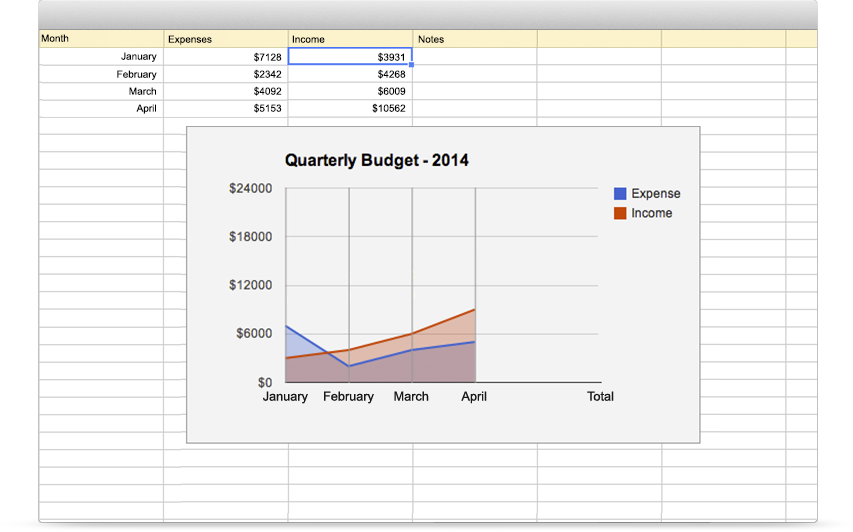
Visualize your data with charts, create pivot tables, and add data filters. Click the Explore button to automatically see trends and patterns from the data in your spreadsheet.
[/et_pb_toggle][et_pb_toggle _builder_version=”3.1.1″ title=”Work with Excel and other file formats”]
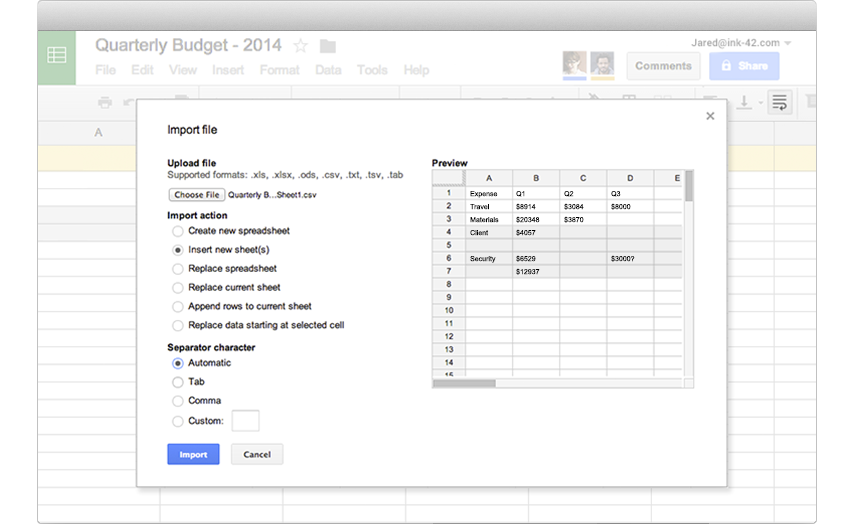
Import existing spreadsheets from other formats like Excel to make them instantly editable and jointly accessible across collaborators in Sheets. Export Sheets in your preferred file type, including .xlsx, .csv, .html, .ods, or .txt form.
[/et_pb_toggle][et_pb_toggle _builder_version=”3.1.1″ title=”Access your spreadsheets anytime, anywhere”]
Create, edit, and share spreadsheets from any device type, no matter where you happen to be. Work in Sheets even when you’re offline.
[/et_pb_toggle][/et_pb_column][/et_pb_row][/et_pb_section][et_pb_section bb_built=”1″ specialty=”off” _builder_version=”3.1.1″ module_id=”tab13″ module_class=”tab-content” background_color=”#d9dfe2″ prev_background_color=”#000000″ next_background_color=”#000000″][et_pb_row background_position=”top_left” background_repeat=”repeat” background_size=”initial”][et_pb_column type=”1_3″][et_pb_image _builder_version=”3.1.1″ src=”https://velvot.org/wp-content/uploads/2018/06/forms-icon.png” animation_style=”slide” animation_duration=”500ms” animation_intensity_slide=”10%” animation_direction=”left” /][/et_pb_column][et_pb_column type=”2_3″][et_pb_text _builder_version=”3.1.1″ animation_style=”fold” animation_direction=”left” module_alignment=”left”]
Forms
[/et_pb_text][et_pb_toggle _builder_version=”3.1.1″ title=”Easy to create surveys and forms for everyone” open=”on”]
- Create custom forms for surveys and questionnaires at no extra cost. Gather everything in a spreadsheet and analyze data right in Google Sheets.
[/et_pb_toggle][et_pb_toggle _builder_version=”3.1.1″ title=”Create a form as easily as creating a document”]
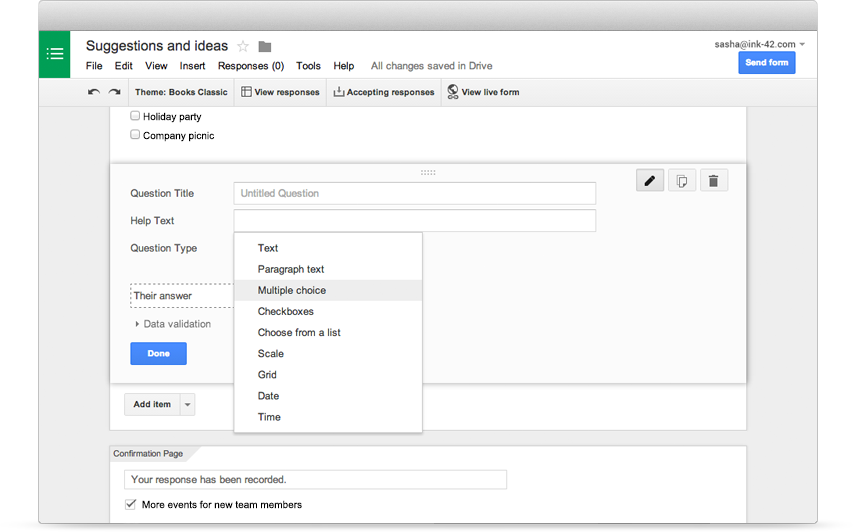
Select from multiple question types, drag-and-drop to reorder questions and customize values as easily as pasting a list.
[/et_pb_toggle][et_pb_toggle _builder_version=”3.1.1″ title=”Send professional looking surveys to customers”]
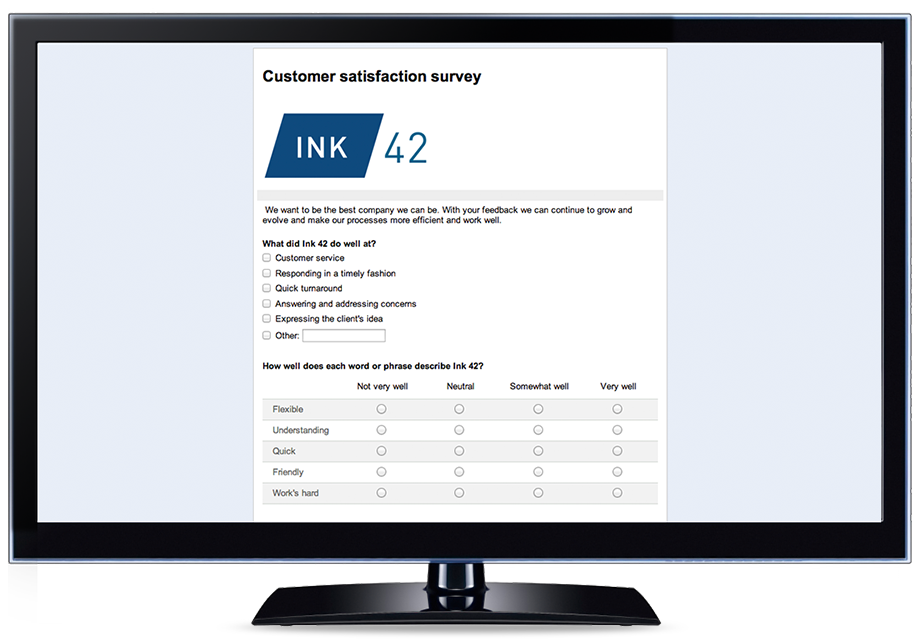
Great looking surveys help you connect with customers to gain valuable insights. Add images, videos, and custom logic to give people who respond a great survey experience.
[/et_pb_toggle][et_pb_toggle _builder_version=”3.1.1″ title=”Analyze responses with automatic summaries”]
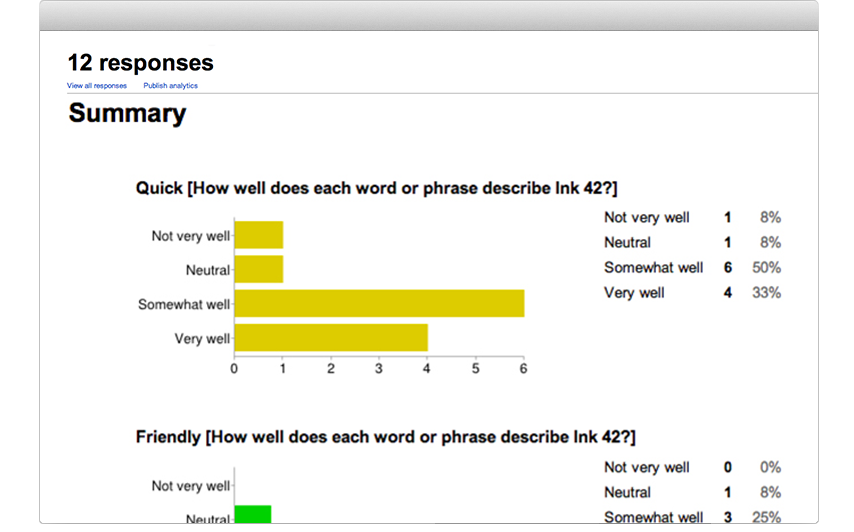
Watch responses appear in real time. You can also access the raw data and analyze it with Google Sheets or other software.
[/et_pb_toggle][/et_pb_column][/et_pb_row][/et_pb_section][et_pb_section bb_built=”1″ specialty=”off” _builder_version=”3.1.1″ module_id=”tab14″ module_class=”tab-content” background_color=”#d9dfe2″ prev_background_color=”#000000″ next_background_color=”#000000″][et_pb_row background_position=”top_left” background_repeat=”repeat” background_size=”initial”][et_pb_column type=”1_3″][et_pb_image _builder_version=”3.1.1″ src=”https://velvot.org/wp-content/uploads/2018/06/slides.png” animation_style=”slide” animation_duration=”500ms” animation_intensity_slide=”10%” animation_direction=”left” /][/et_pb_column][et_pb_column type=”2_3″][et_pb_text _builder_version=”3.1.1″ animation_style=”fold” animation_direction=”left” module_alignment=”left”]
Slides
[/et_pb_text][et_pb_toggle _builder_version=”3.1.1″ title=”Beautiful presentations created together” open=”on”]
Create and edit polished presentations in your browser—no software required. Multiple people can work at the same time so everyone always has the latest version.
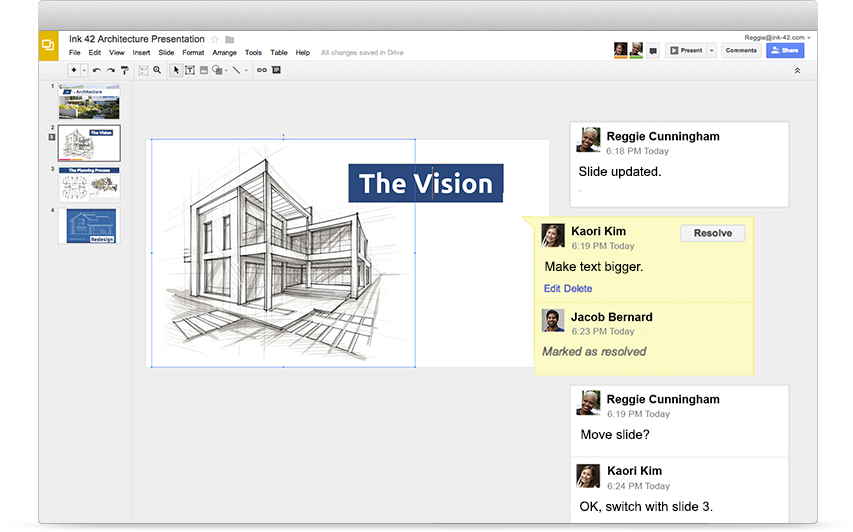
[/et_pb_toggle][et_pb_toggle _builder_version=”3.1.1″ title=”Commenting, chat and real-time editing”]
Work on a single presentation online with your business partner, your whole team or external contacts. You control who gets permission to edit, view or just add comments.
[/et_pb_toggle][et_pb_toggle _builder_version=”3.1.1″ title=”Easy-to-design slides”]
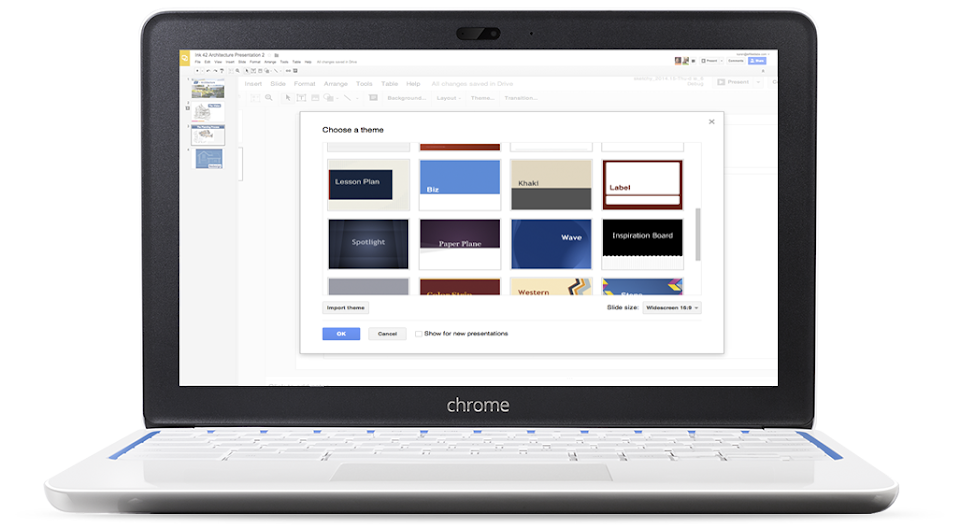
Start from scratch or expedite the process by choosing a template. You can enhance your presentations with videos, images, drawings and smooth transitions.
[/et_pb_toggle][/et_pb_column][/et_pb_row][/et_pb_section][et_pb_section bb_built=”1″ specialty=”off” _builder_version=”3.1.1″ module_id=”tab15″ module_class=”tab-content” background_color=”#d9dfe2″ prev_background_color=”#000000″ next_background_color=”#000000″][et_pb_row background_position=”top_left” background_repeat=”repeat” background_size=”initial”][et_pb_column type=”1_3″][et_pb_image _builder_version=”3.1.1″ src=”https://velvot.org/wp-content/uploads/2018/06/sites.png” animation_style=”slide” animation_duration=”500ms” animation_intensity_slide=”10%” animation_direction=”left” /][/et_pb_column][et_pb_column type=”2_3″][et_pb_text _builder_version=”3.1.1″ animation_style=”fold” animation_direction=”left” module_alignment=”left”]
Sites
[/et_pb_text][et_pb_toggle _builder_version=”3.1.1″ title=”Effortlessly create impactful team sites” open=”on”]
Collaboratively create engaging, high-quality sites for your team, project or event. The sites look great on every screen, from desktop to smartphone. All without learning design or programming.
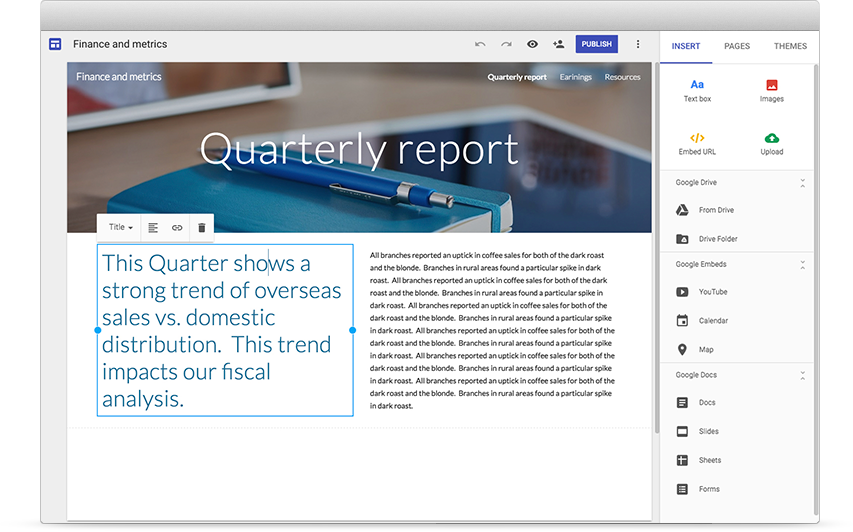
[/et_pb_toggle][et_pb_toggle _builder_version=”3.1.1″ title=”Create a site, no programming or design skills needed”]
Sites makes it a simple to exhibit your team’s work, with easy access to all your content from G Suite – whether it’s a Drive folder, Doc, or even shared Calendar.
[/et_pb_toggle][et_pb_toggle _builder_version=”3.1.1″ title=”Your content automatically looks its best across devices”]
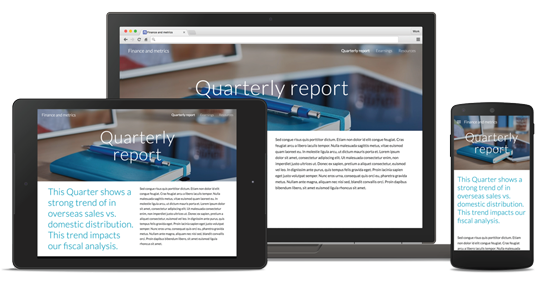
Carefully created themes help make your content stand out. Sites intelligently optimizes your work so it looks great on desktop, tablet, and mobile.
[/et_pb_toggle][/et_pb_column][/et_pb_row][/et_pb_section][et_pb_section bb_built=”1″ specialty=”off” _builder_version=”3.1.1″ module_id=”tab16″ module_class=”tab-content” background_color=”#d9dfe2″ prev_background_color=”#000000″ next_background_color=”#000000″][et_pb_row background_position=”top_left” background_repeat=”repeat” background_size=”initial”][et_pb_column type=”1_3″][et_pb_image _builder_version=”3.1.1″ src=”https://velvot.org/wp-content/uploads/2018/06/app-maker.png” animation_style=”slide” animation_duration=”500ms” animation_intensity_slide=”10%” animation_direction=”left” /][/et_pb_column][et_pb_column type=”2_3″][et_pb_text _builder_version=”3.1.1″ animation_style=”fold” animation_direction=”left” module_alignment=”left”]
App Maker
[/et_pb_text][et_pb_toggle _builder_version=”3.1.1″ title=”Business apps your company needs, built by you” open=”on”]
- Build apps that help fill gaps, like accelerating business workflows or scaling internal operations, with G Suite’s low-code development environment. App Maker is included with G Suite Business and Enterprise editions as well as with G Suite for Education.
[/et_pb_toggle][et_pb_toggle _builder_version=”3.1.1″ title=”Build apps faster”]
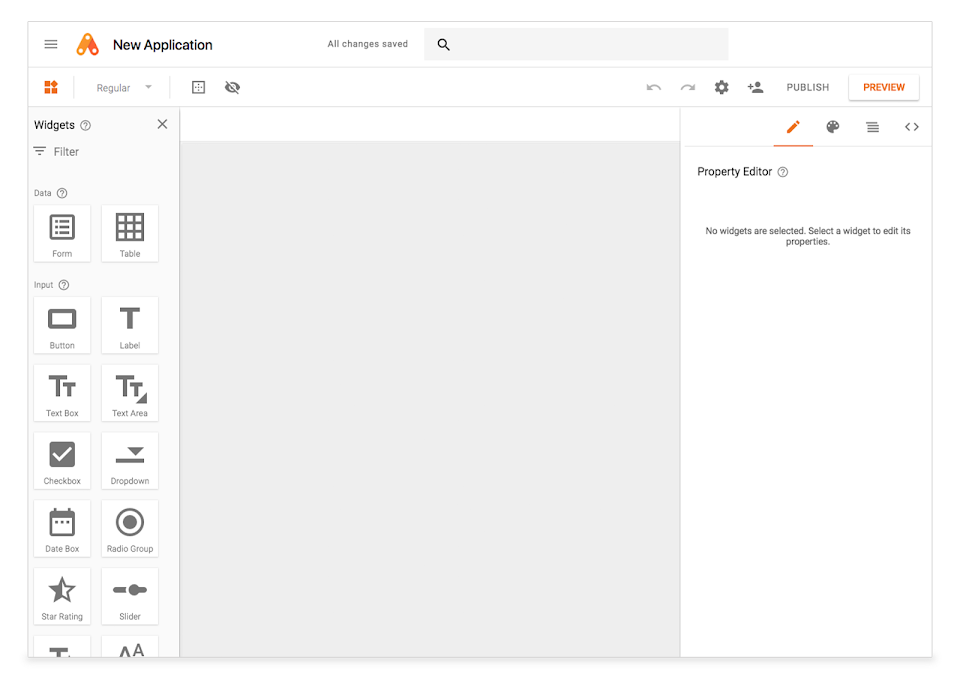
Templates, drag-and-drop UI design and declarative data modeling make it easy for IT developers and enthusiasts to build apps that empower your teams.
[/et_pb_toggle][et_pb_toggle _builder_version=”3.1.1″ title=”Gain insights and drive actions with connected apps”]
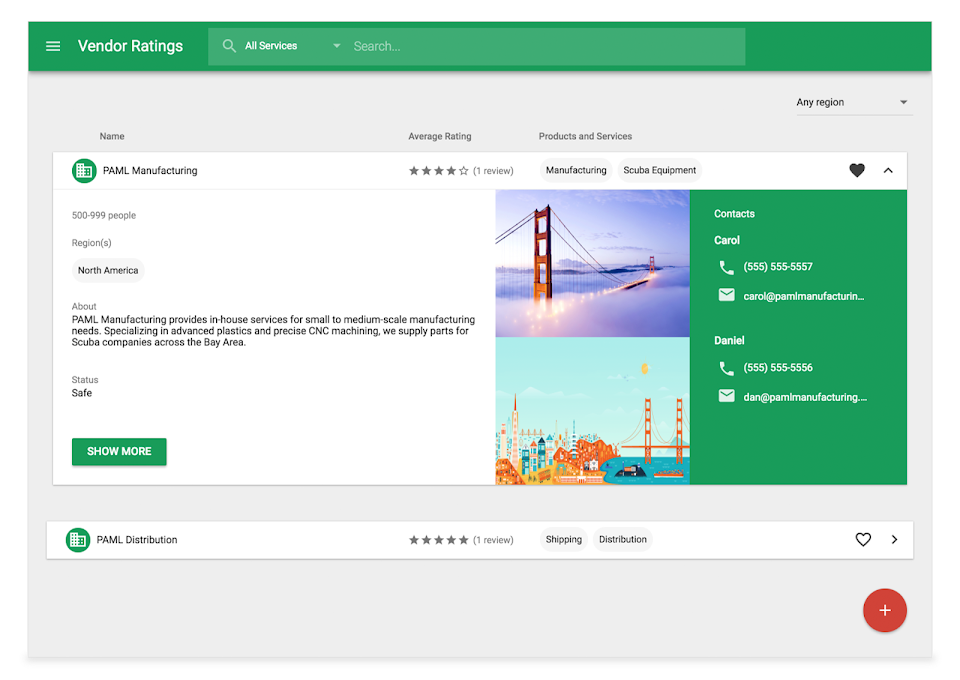
Whether it’s Gmail, Calendar or Sheets, it’s a cinch to connect with the data and services you need to make your apps more powerful. Plus, you can use Apps Script to access Google Cloud Platform and other third-party services.
[/et_pb_toggle][et_pb_toggle _builder_version=”3.1.1″ title=”Stay in control”]
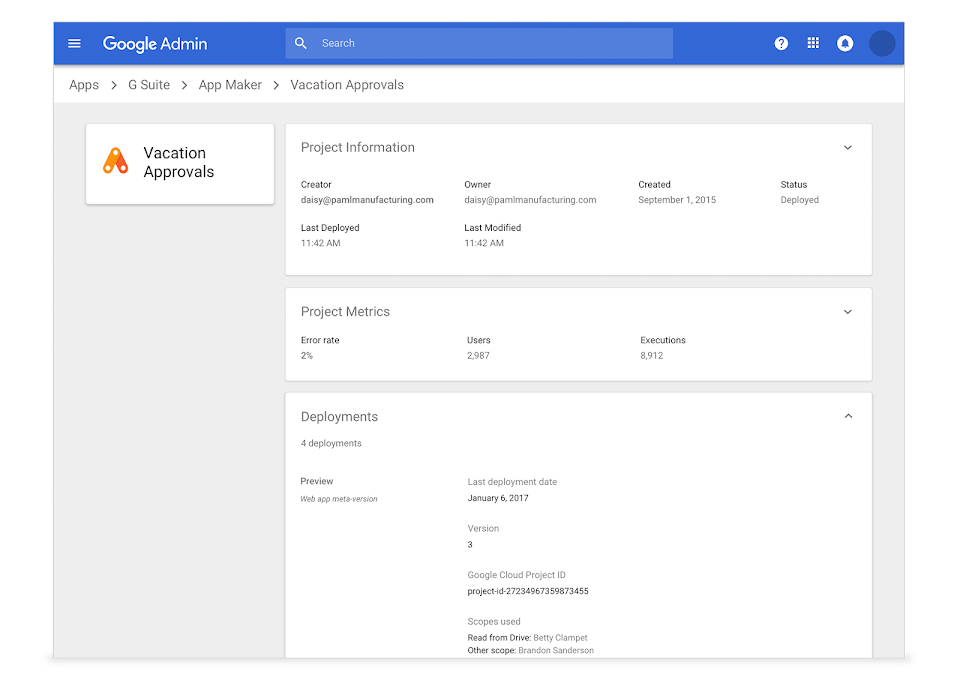
G Suite administrators maintain visibility over what apps are running in their organizations, including information about owners, usage metrics and OAuth permissions.
[/et_pb_toggle][/et_pb_column][/et_pb_row][/et_pb_section][et_pb_section bb_built=”1″ specialty=”off” _builder_version=”3.1.1″ module_id=”tab17″ module_class=”tab-content” background_color=”#d9dfe2″ prev_background_color=”#000000″ next_background_color=”#000000″][et_pb_row background_position=”top_left” background_repeat=”repeat” background_size=”initial”][et_pb_column type=”1_3″][et_pb_image _builder_version=”3.1.1″ src=”https://velvot.org/wp-content/uploads/2018/06/Keep.png” animation_style=”slide” animation_duration=”500ms” animation_intensity_slide=”10%” animation_direction=”left” /][/et_pb_column][et_pb_column type=”2_3″][et_pb_text _builder_version=”3.1.1″ animation_style=”fold” animation_direction=”left” module_alignment=”left”]
Keep
[/et_pb_text][et_pb_toggle _builder_version=”3.1.1″ title=”Capture what’s important and get more done.” open=”on”]
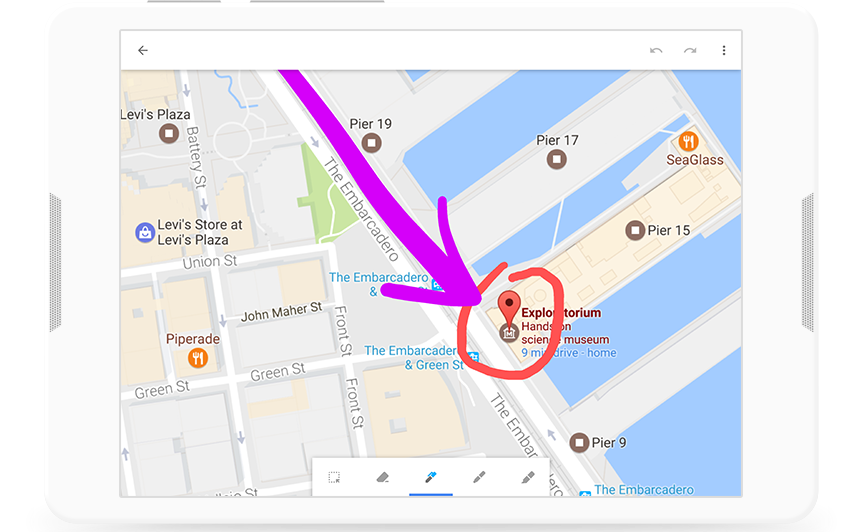
Keep organized. Capture inspiration and to-dos effortlessly. Collaborate on notes with teammates and set reminders to stay on track. Everything syncs across your devices, so what’s important is always in reach.
[/et_pb_toggle][et_pb_toggle _builder_version=”3.1.1″ title=”Do more together.”]
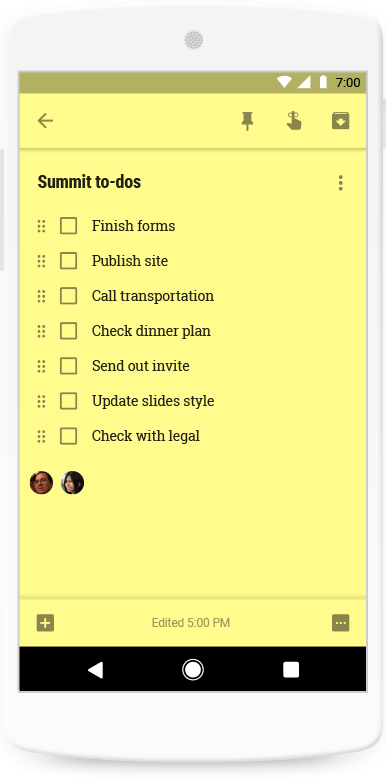
With Keep, it’s easy to collaborate with your colleagues on notes, lists, photos, audio, and drawings. Capture brainstorm ideas quickly, keep them on hand while you work, and watch to-dos get checked off in real time.
[/et_pb_toggle][et_pb_toggle _builder_version=”3.1.1″ title=”Update notes anytime, anywhere.”]
Access, create, and edit notes wherever you go — from your computer, phone, or tablet — even when there’s no connection. Every edit you make is automatically saved and updated across all devices.
[/et_pb_toggle][/et_pb_column][/et_pb_row][/et_pb_section][et_pb_section bb_built=”1″ specialty=”off” _builder_version=”3.1.1″ module_id=”tab18″ module_class=”tab-content” background_color=”#d9dfe2″ prev_background_color=”#000000″ next_background_color=”#ffffff”][et_pb_row background_position=”top_left” background_repeat=”repeat” background_size=”initial”][et_pb_column type=”1_3″][et_pb_image _builder_version=”3.1.1″ src=”https://velvot.org/wp-content/uploads/2018/06/jamboard.png” animation_style=”slide” animation_duration=”500ms” animation_intensity_slide=”10%” animation_direction=”left” /][/et_pb_column][et_pb_column type=”2_3″][et_pb_text _builder_version=”3.1.1″ animation_style=”fold” animation_direction=”left” module_alignment=”left”]
Jamboard
[/et_pb_text][et_pb_toggle _builder_version=”3.1.1″ title=”Visualize your ideas in a new and collaborative way” open=”on”]
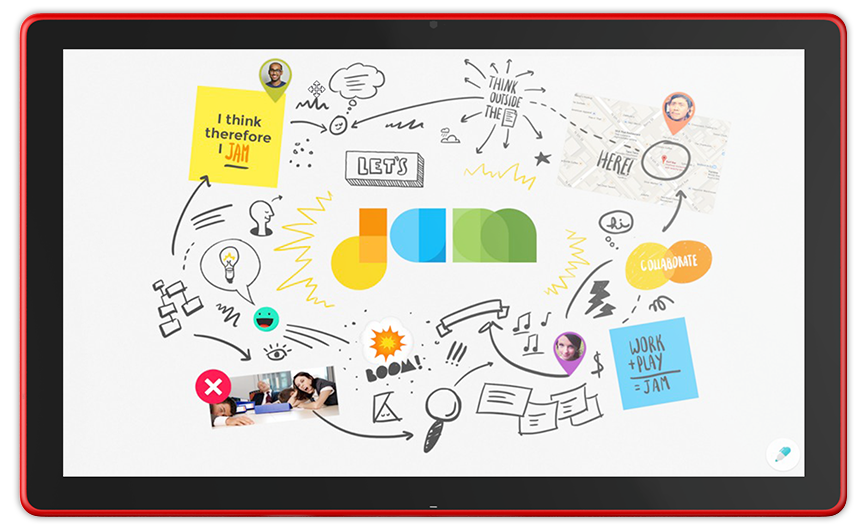
Unleash your team’s creativity with Jamboard. Sketch your ideas whiteboard-style while benefiting from the access and connectivity of an interactive canvas. Drop images, add notes, and pull assets directly from the web while collaborating with team members from anywhere.
[/et_pb_toggle][et_pb_toggle _builder_version=”3.1.1″ title=”Create, collaborate, and bring your team’s ideas to life”]
Jamboard unlocks your team’s creative potential with real-time co-authoring. Experience unhindered productivity, whether your team is in the same room using multiple Jamboards, or across the world using the Jamboard app on mobile.

[/et_pb_toggle][et_pb_toggle _builder_version=”3.1.1″ title=”A familiar canvas, rethought for the cloud.”]
With Jamboard’s incredibly responsive and accurate display, it feels natural to draw and sketch the way you would on a traditional whiteboard. Enrich your brainstorm with the best of Google Search and your team’s work in G Suite: Grab images and content from the web and bring them straight into your jam; pull in work from Docs, Sheets, and Slides; even add photos stored in Drive.
[/et_pb_toggle][et_pb_toggle _builder_version=”3.1.1″ title=”Designed for precision and ease.”]
Jamboard’s stunning 55-inch, 4k display shines as the focal point for creativity in the workplace. It’s easy to move around the office with its purpose-built portable stand and single-cable setup. You’ll never have to worry about running out of ink or batteries thanks to a passive stylus and eraser that don’t require pairing.

[/et_pb_toggle][/et_pb_column][/et_pb_row][/et_pb_section][et_pb_section bb_built=”1″ fullwidth=”off” specialty=”off” prev_background_color=”#d9dfe2″ next_background_color=”#000000″][et_pb_row][et_pb_column type=”4_4″][et_pb_text admin_label=”Access” _builder_version=”3.1.1″ text_orientation=”center” module_alignment=”center” max_width=”65%” max_width_tablet=”80%” max_width_phone=”100%” max_width_last_edited=”on|phone”]
Access
Store and Access your files from everywhere on any device, also search what you need instantly.
[/et_pb_text][/et_pb_column][/et_pb_row][/et_pb_section][et_pb_section bb_built=”1″ specialty=”off” _builder_version=”3.1.1″ custom_padding=”0px|0px|0px|0px” module_id=”blurb-tabs” prev_background_color=”#000000″ custom_margin=”-60px|||” next_background_color=”#d9dfe2″][et_pb_row background_position=”top_left” background_repeat=”repeat” background_size=”initial” _builder_version=”3.0.75″ background_position_1=”top_left” background_repeat_1=”no-repeat” make_fullwidth=”on” use_custom_gutter=”on” gutter_width=”1″ custom_padding=”0px||0px|”][et_pb_column type=”4_4″][et_pb_blurb admin_label=”Blurb %22Drive%22″ _builder_version=”3.1.1″ title=”Drive” url=”#tab21″ use_icon=”on” font_icon=”%%97%%” icon_color=”#0c71c3″ use_icon_font_size=”on” text_orientation=”center” module_class=”tab-title” custom_padding=”40px|40px|40px|40px” icon_font_size=”70px” header_font_size=”24″ header_font_size_phone=”20″ header_font_size_last_edited=”on|phone” custom_padding_last_edited=”on|phone” animation_style=”flip” custom_padding_tablet=”20px|20px|20px|20px” custom_padding_phone=”10px|20px|10px|20px” animation_duration=”500ms” max_width_tablet=”50px” icon_font_size_last_edited=”on|phone” icon_font_size_tablet=”50px” icon_font_size_phone=”30px” header_text_align=”center” body_text_align=”center” /][et_pb_blurb admin_label=”Blurb %22Search%22″ _builder_version=”3.1.1″ title=”Cloud Search” url=”#tab22″ use_icon=”on” font_icon=”%%52%%” icon_color=”#21b51e” use_icon_font_size=”on” text_orientation=”center” module_class=”tab-title” custom_padding=”40px|40px|40px|40px” icon_font_size=”70px” header_font_size=”24″ header_font_size_phone=”20″ header_font_size_last_edited=”on|phone” custom_padding_last_edited=”on|phone” animation_style=”flip” custom_padding_tablet=”20px|20px|20px|20px” custom_padding_phone=”10px|20px|10px|20px” animation_duration=”500ms” max_width_tablet=”50px” icon_font_size_last_edited=”on|phone” icon_font_size_tablet=”50px” icon_font_size_phone=”30px” body_text_align=”center” /][/et_pb_column][/et_pb_row][/et_pb_section][et_pb_section bb_built=”1″ specialty=”off” _builder_version=”3.1.1″ module_id=”tab21″ module_class=”tab-content” background_color=”#d9dfe2″ prev_background_color=”#ffffff” next_background_color=”#000000″][et_pb_row background_position=”top_left” background_repeat=”repeat” background_size=”initial”][et_pb_column type=”1_3″][et_pb_image _builder_version=”3.1.1″ src=”https://velvot.org/wp-content/uploads/2018/06/drive.png” animation_style=”slide” animation_duration=”500ms” animation_intensity_slide=”10%” animation_direction=”left” /][/et_pb_column][et_pb_column type=”2_3″][et_pb_text _builder_version=”3.1.1″ animation_style=”fold” animation_direction=”left” module_alignment=”left”]
Drive
[/et_pb_text][et_pb_toggle _builder_version=”3.1.1″ title=”Store, access, and share your files in one secure place” open=”on”]
Store any and every file. Access files anytime, anywhere from your desktop and mobile devices. Control how files are shared.
[/et_pb_toggle][et_pb_toggle _builder_version=”3.1.1″ title=”Get all the storage capacity you need”]
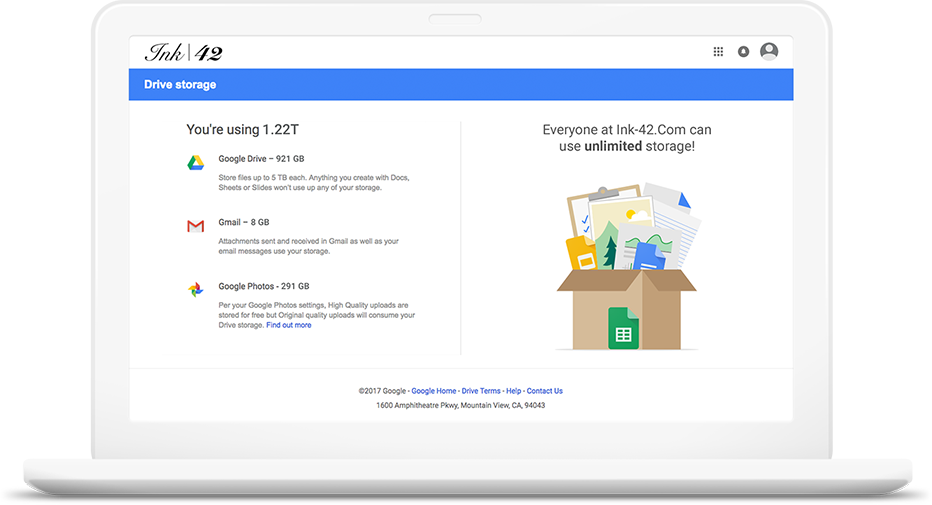
G Suite’s Business and Enterprise editions provide unlimited storage so you will always have enough space for your files. With centralized administration, data loss prevention, and Vault for Drive you can easily manage users and file sharing to meet data compliance needs.
[/et_pb_toggle][et_pb_toggle _builder_version=”3.1.1″ title=”Find what you didn’t know you needed”]
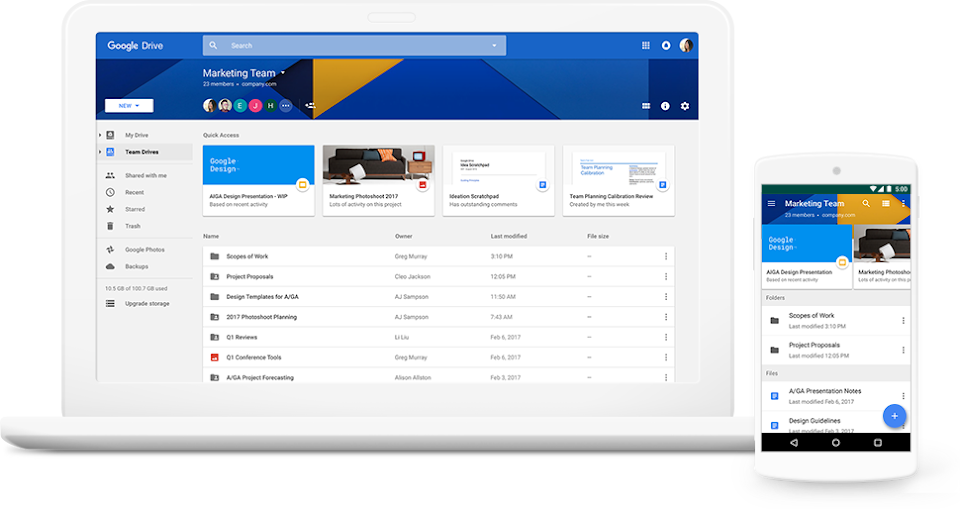
With Google-powered machine learning, Drive predicts what you’ll need to access before you do. Quick Access in Drive uses signals from natural language search, optical character recognition to surface what’s important and save you time searching.
[/et_pb_toggle][et_pb_toggle _builder_version=”3.1.1″ title=”Organize team files in a shared space”]
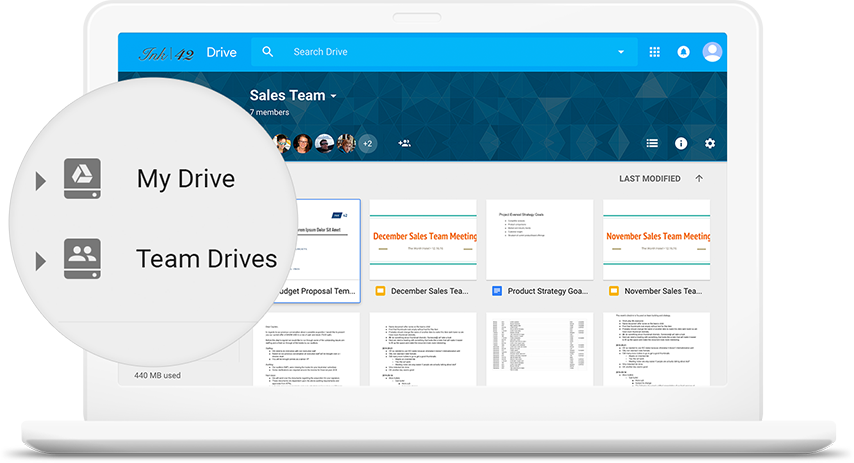
Use Team Drives to store your team’s work in secure, easy-to-manage shared spaces. Any files added to Team Drives are owned collectively by the team, so everyone stays up to date.
[/et_pb_toggle][et_pb_toggle _builder_version=”3.1.1″ title=”Access files from your computer without a browser”]
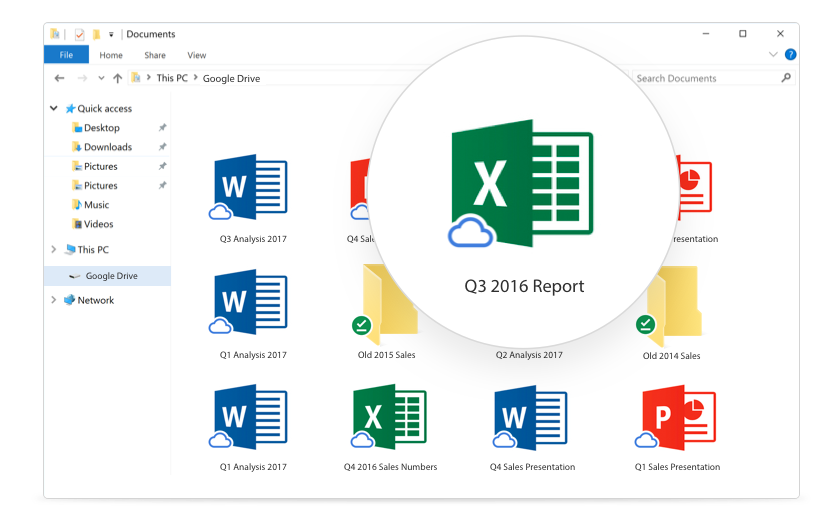
Drive File Stream gives you access to files directly from your computer, without impacting all of your disk space. Spend less time waiting for files to sync and more time being productive.
[/et_pb_toggle][/et_pb_column][/et_pb_row][/et_pb_section][et_pb_section bb_built=”1″ specialty=”off” _builder_version=”3.1.1″ module_id=”tab22″ module_class=”tab-content” background_color=”#d9dfe2″ prev_background_color=”#000000″ next_background_color=”#ffffff”][et_pb_row background_position=”top_left” background_repeat=”repeat” background_size=”initial”][et_pb_column type=”1_3″][et_pb_image _builder_version=”3.1.1″ src=”https://velvot.org/wp-content/uploads/2018/06/cloud-search.png” animation_style=”slide” animation_duration=”500ms” animation_intensity_slide=”10%” animation_direction=”left” /][/et_pb_column][et_pb_column type=”2_3″][et_pb_text _builder_version=”3.1.1″ animation_style=”fold” animation_direction=”left” module_alignment=”left”]
Cloud Search
[/et_pb_text][et_pb_toggle _builder_version=”3.1.1″ title=”The information you need, right when you need it” open=”on”]
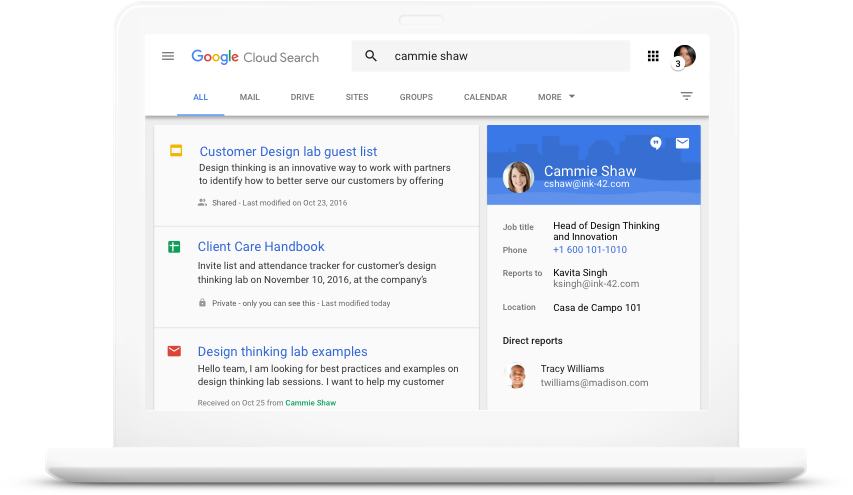
Use the power of Google to search across your company’s content in G Suite. From Gmail and Drive to Docs, Sheets, Slides, Calendar, and more, Google Cloud Search answers your questions and delivers relevant suggestions to help you throughout the day.
[/et_pb_toggle][et_pb_toggle _builder_version=”3.1.1″ title=”Google Search — built for G Suite”]
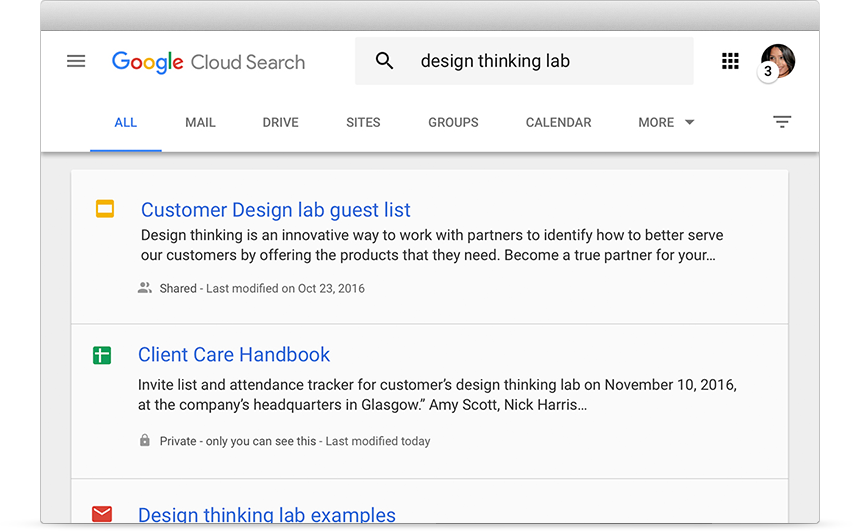
Cloud Search is just like Google Search – built for G Suite. Search emails, docs, events, the corporate directory, and more. Find whatever you’re looking for, wherever it’s located.
[/et_pb_toggle][et_pb_toggle _builder_version=”3.1.1″ title=”Get what you need, before you ask”]
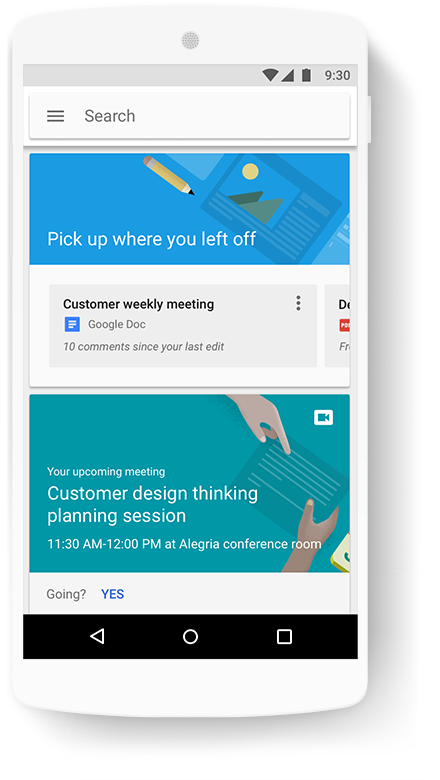
Open the Cloud Search app to get timely and relevant assist cards that help keep you organized throughout the day. Google intelligence helps you stay on top of meetings, docs, emails, and more.
[/et_pb_toggle][et_pb_toggle _builder_version=”3.1.1″ title=”Find people faster”]
Search your company directory. See colleagues’ contact details, plus events and files you have in common. Send an email, make a call, or start a Hangout with just a click or a tap.
[/et_pb_toggle][/et_pb_column][/et_pb_row][/et_pb_section][et_pb_section bb_built=”1″ fullwidth=”off” specialty=”off” prev_background_color=”#d9dfe2″ next_background_color=”#000000″][et_pb_row][et_pb_column type=”4_4″][et_pb_text _builder_version=”3.1.1″ text_orientation=”center” module_alignment=”center” max_width=”65%” max_width_tablet=”80%” max_width_phone=”100%” max_width_last_edited=”on|phone”]
Control
Manage users, devices, and data securely and easily from any device.
[/et_pb_text][/et_pb_column][/et_pb_row][/et_pb_section][et_pb_section bb_built=”1″ specialty=”off” _builder_version=”3.1.1″ custom_padding=”0px|0px|0px|0px” module_id=”blurb-tabs” prev_background_color=”#000000″ custom_margin=”-60px|||” next_background_color=”#d9dfe2″][et_pb_row background_position=”top_left” background_repeat=”repeat” background_size=”initial” _builder_version=”3.0.75″ background_position_1=”top_left” background_repeat_1=”no-repeat” make_fullwidth=”on” use_custom_gutter=”on” gutter_width=”1″ custom_padding=”0px||0px|”][et_pb_column type=”4_4″][et_pb_blurb admin_label=”Blurb %22Admin%22″ _builder_version=”3.1.1″ title=”Admin” url=”#tab31″ use_icon=”on” font_icon=”%%173%%” icon_color=”#0c71c3″ use_icon_font_size=”on” text_orientation=”center” module_class=”tab-title” custom_padding=”40px|40px|40px|40px” icon_font_size=”70px” header_font_size=”24″ header_font_size_phone=”20″ header_font_size_last_edited=”on|phone” custom_padding_last_edited=”on|phone” animation_style=”flip” custom_padding_tablet=”20px|20px|20px|20px” custom_padding_phone=”10px|20px|10px|20px” animation_duration=”500ms” max_width_tablet=”50px” icon_font_size_last_edited=”on|phone” icon_font_size_tablet=”50px” icon_font_size_phone=”30px” header_text_align=”center” body_text_align=”center” /][et_pb_blurb admin_label=”Blurb %22Vault%22″ _builder_version=”3.1.1″ title=”Vault” url=”#tab32″ use_icon=”on” font_icon=”%%186%%” icon_color=”#21b51e” use_icon_font_size=”on” text_orientation=”center” module_class=”tab-title” custom_padding=”40px|40px|40px|40px” icon_font_size=”70px” header_font_size=”24″ header_font_size_phone=”20″ header_font_size_last_edited=”on|phone” custom_padding_last_edited=”on|phone” animation_style=”flip” custom_padding_tablet=”20px|20px|20px|20px” custom_padding_phone=”10px|20px|10px|20px” animation_duration=”500ms” max_width_tablet=”50px” icon_font_size_last_edited=”on|phone” icon_font_size_tablet=”50px” icon_font_size_phone=”30px” body_text_align=”center” /][et_pb_blurb admin_label=”Blurb %22Mobile%22″ _builder_version=”3.1.1″ title=”Mobile” url=”#tab33″ use_icon=”on” font_icon=”%%104%%” icon_color=”#21b51e” use_icon_font_size=”on” text_orientation=”center” module_class=”tab-title” custom_padding=”40px|40px|40px|40px” icon_font_size=”70px” header_font_size=”24″ header_font_size_phone=”20″ header_font_size_last_edited=”on|phone” custom_padding_last_edited=”on|phone” animation_style=”flip” custom_padding_tablet=”20px|20px|20px|20px” custom_padding_phone=”10px|20px|10px|20px” animation_duration=”500ms” max_width_tablet=”50px” icon_font_size_last_edited=”on|phone” icon_font_size_tablet=”50px” icon_font_size_phone=”30px” body_text_align=”center” /][/et_pb_column][/et_pb_row][/et_pb_section][et_pb_section bb_built=”1″ specialty=”off” _builder_version=”3.1.1″ module_id=”tab31″ module_class=”tab-content” background_color=”#d9dfe2″ prev_background_color=”#ffffff” next_background_color=”#000000″][et_pb_row background_position=”top_left” background_repeat=”repeat” background_size=”initial”][et_pb_column type=”1_3″][et_pb_image _builder_version=”3.1.1″ src=”https://velvot.org/wp-content/uploads/2018/06/admin.png” animation_style=”slide” animation_duration=”500ms” animation_intensity_slide=”10%” animation_direction=”left” /][/et_pb_column][et_pb_column type=”2_3″][et_pb_text _builder_version=”3.1.1″ animation_style=”fold” animation_direction=”left” module_alignment=”left”]
Admin
[/et_pb_text][et_pb_toggle _builder_version=”3.1.1″ title=”Manage G Suite for your organization” open=”on”]
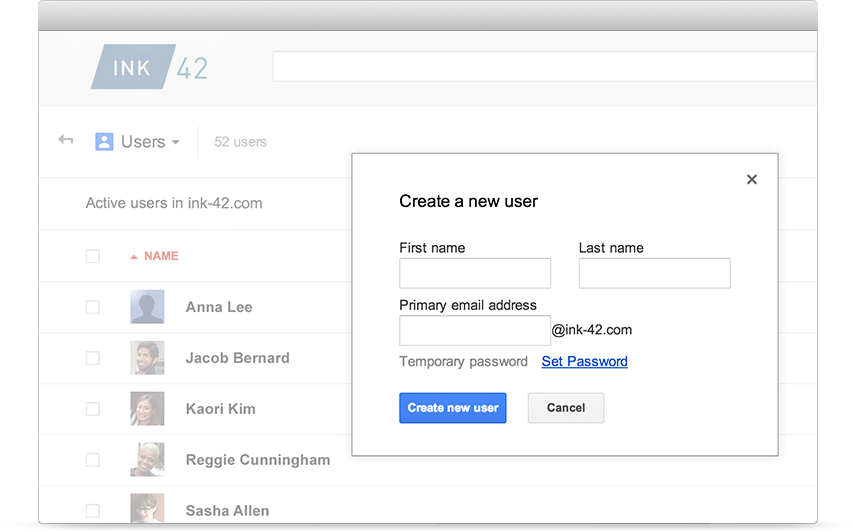
Easily add users, manage devices and configure security and settings so your data stays safe. Administration shouldn’t need a manual.
[/et_pb_toggle][et_pb_toggle _builder_version=”3.1.1″ title=”Security and control”]
Centralized administration makes setup and management fast and easy. Add and remove users, set up groups, and add security options like 2-step verification and SSO.
[/et_pb_toggle][et_pb_toggle _builder_version=”3.1.1″ title=”Mobile device management”]
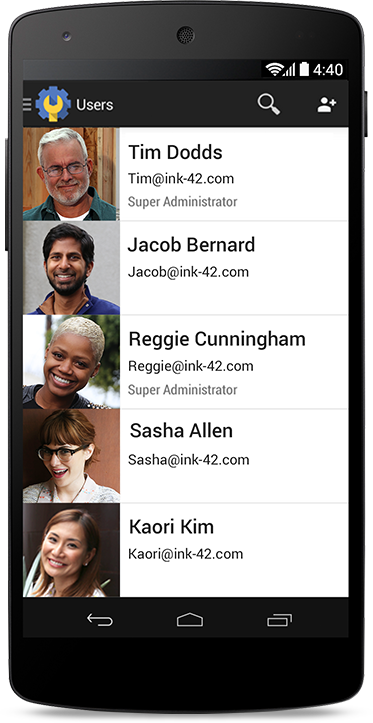
Distribute apps to employees and keep data secure on employee’s iOS and Android devices. Use mobile management to distribute apps and get employees up and running quickly, check usage, manage security settings, and lock or wipe devices remotely.
[/et_pb_toggle][et_pb_toggle _builder_version=”3.1.1″ title=”24/7 support and reliability”]
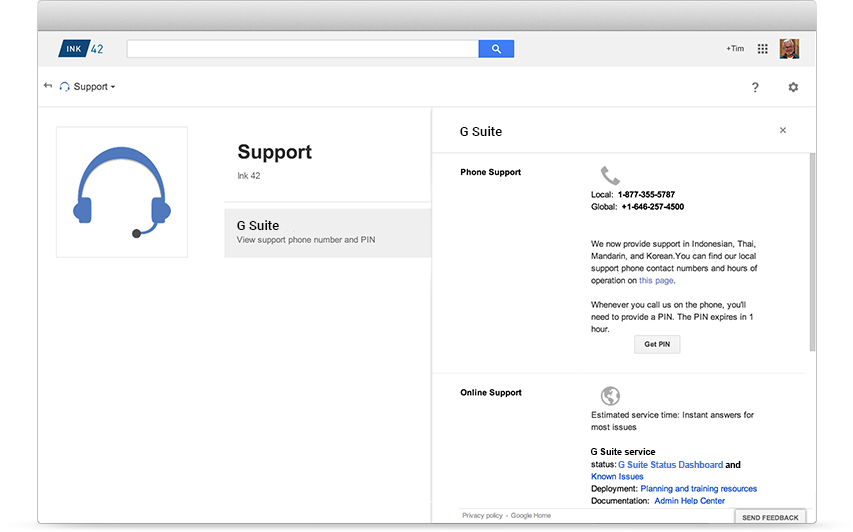
Call or email Google support 24/7. Combine our support team, with our world-class data center networks, and we’ve definitely got you covered.
[/et_pb_toggle][/et_pb_column][/et_pb_row][/et_pb_section][et_pb_section bb_built=”1″ specialty=”off” _builder_version=”3.1.1″ module_id=”tab32″ module_class=”tab-content” background_color=”#d9dfe2″ prev_background_color=”#000000″ next_background_color=”#000000″][et_pb_row background_position=”top_left” background_repeat=”repeat” background_size=”initial”][et_pb_column type=”1_3″][et_pb_image _builder_version=”3.1.1″ src=”https://velvot.org/wp-content/uploads/2018/06/vault.png” animation_style=”slide” animation_duration=”500ms” animation_intensity_slide=”10%” animation_direction=”left” /][/et_pb_column][et_pb_column type=”2_3″][et_pb_text _builder_version=”3.1.1″ animation_style=”fold” animation_direction=”left” module_alignment=”left”]
Vault
[/et_pb_text][et_pb_toggle _builder_version=”3.1.1″ title=”Archiving and eDiscovery for email, files, and chats” open=”on”]
Manage, retain, search, and export your organization’s email, Google Drive file content and on-the-record chats. As a part of G Suite Business and Enterprise editions, Vault allows you to archive corporate data from G Suite products including, Gmail, Google Drive, Google Teams Drive, Google Groups, and Google Hangouts Meet.
[/et_pb_toggle][et_pb_toggle _builder_version=”3.1.1″ title=”Protect business data with email archiving & legal holds”]
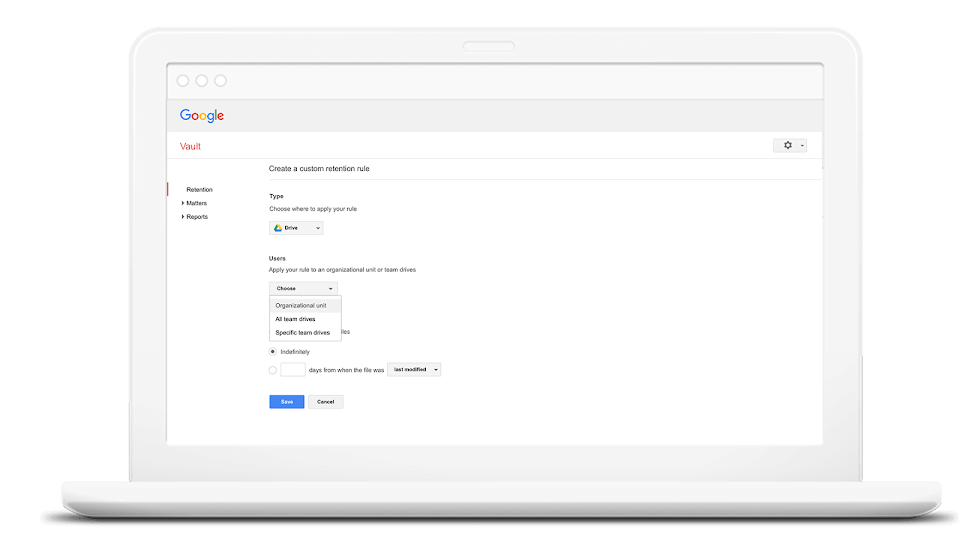
Safely set retention policies on supported content for an entire domain or for specific organizational units with date ranges and specific query terms. Vault enables you to track and keep logged data for legal audits.
[/et_pb_toggle][et_pb_toggle _builder_version=”3.1.1″ title=”Find content quickly with Google-powered search”]
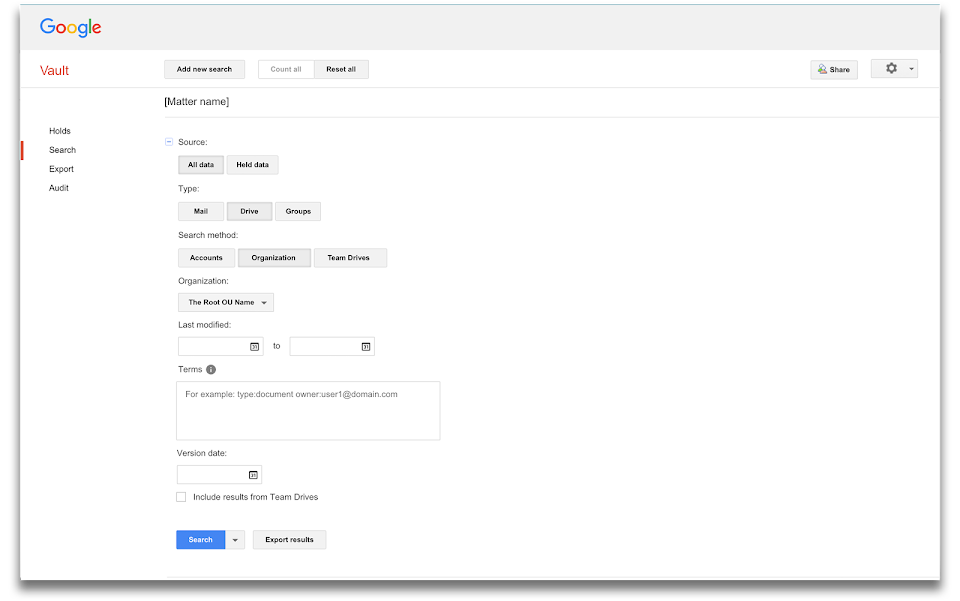
Find and retrieve valuable information, even from suspended accounts. It’s a smart way to gather what your legal team needs and prevent data loss from employee turnover. You can also export past versions of Google Drive files.
[/et_pb_toggle][/et_pb_column][/et_pb_row][/et_pb_section][et_pb_section bb_built=”1″ specialty=”off” _builder_version=”3.1.1″ module_id=”tab33″ module_class=”tab-content” background_color=”#d9dfe2″ prev_background_color=”#000000″ next_background_color=”#ffffff”][et_pb_row background_position=”top_left” background_repeat=”repeat” background_size=”initial”][et_pb_column type=”1_3″][et_pb_image _builder_version=”3.1.1″ src=”https://velvot.org/wp-content/uploads/2018/06/mobile.png” animation_style=”slide” animation_duration=”500ms” animation_intensity_slide=”10%” animation_direction=”left” /][/et_pb_column][et_pb_column type=”2_3″][et_pb_text _builder_version=”3.1.1″ animation_style=”fold” animation_direction=”left” module_alignment=”left”]
Mobile Management
[/et_pb_text][et_pb_toggle _builder_version=”3.1.1″ title=”keep mobiles secured” open=”on”]
Keep employees happy and data secure with easy to set-up mobile management for Android, iOS, Windows and other smartphones.
[/et_pb_toggle][et_pb_toggle _builder_version=”3.1.1″ title=”Keep data secure”]
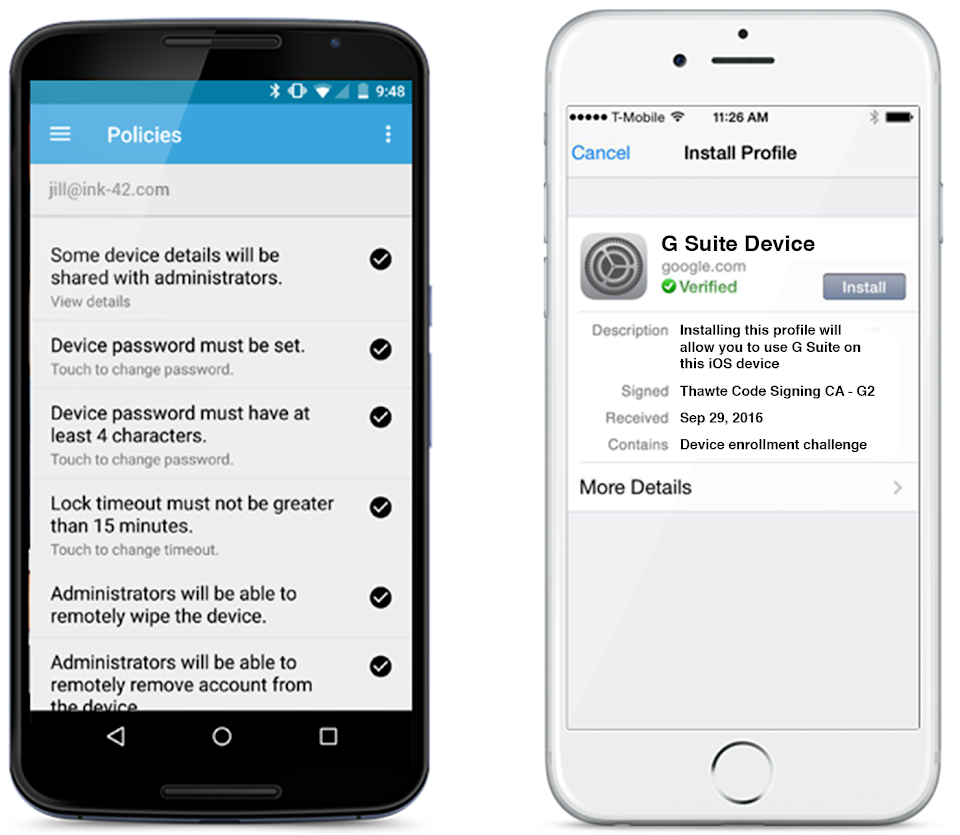
A lost phone. A stolen tablet. Things happen. Keep your company’s data secure with mobile device management (MDM). You can require screen locks, strong passwords, and erase confidential data with device wipe or selective account wipe for Android and iOS.
[/et_pb_toggle][et_pb_toggle _builder_version=”3.1.1″ title=”Easy to manage”]
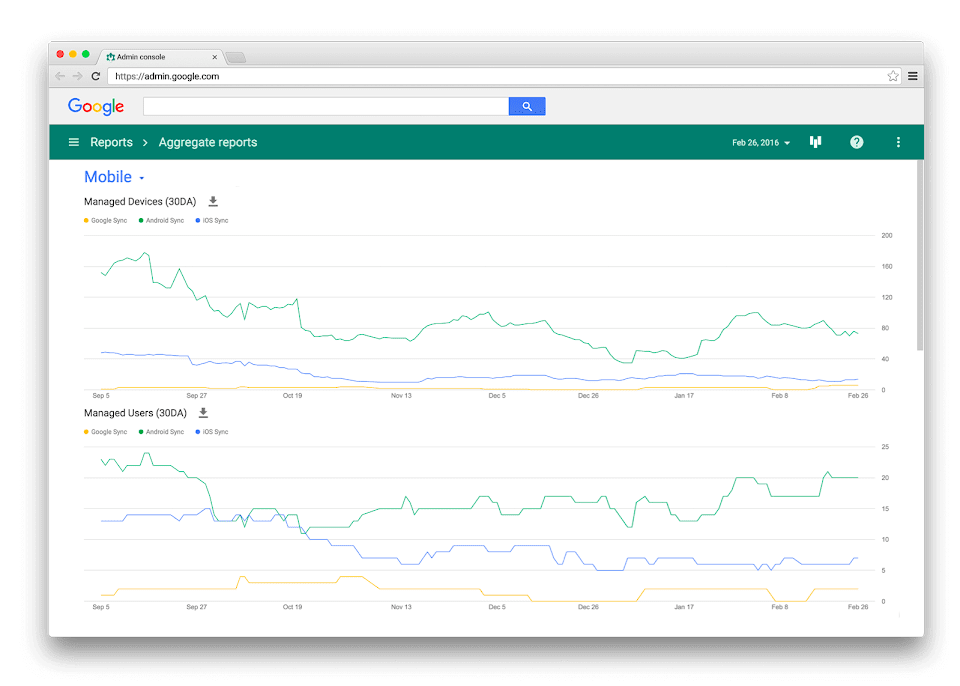
Device management is included with G Suite, so no need to purchase and set up extra services. Simply enable from the Admin console, then Gmail, Google Drive and other mobile apps will be secure and managed. And you can view graphs and reports about mobile usage and trends at anytime in the reporting section.
[/et_pb_toggle][et_pb_toggle _builder_version=”3.1.1″ title=”Distribute work apps quickly”]
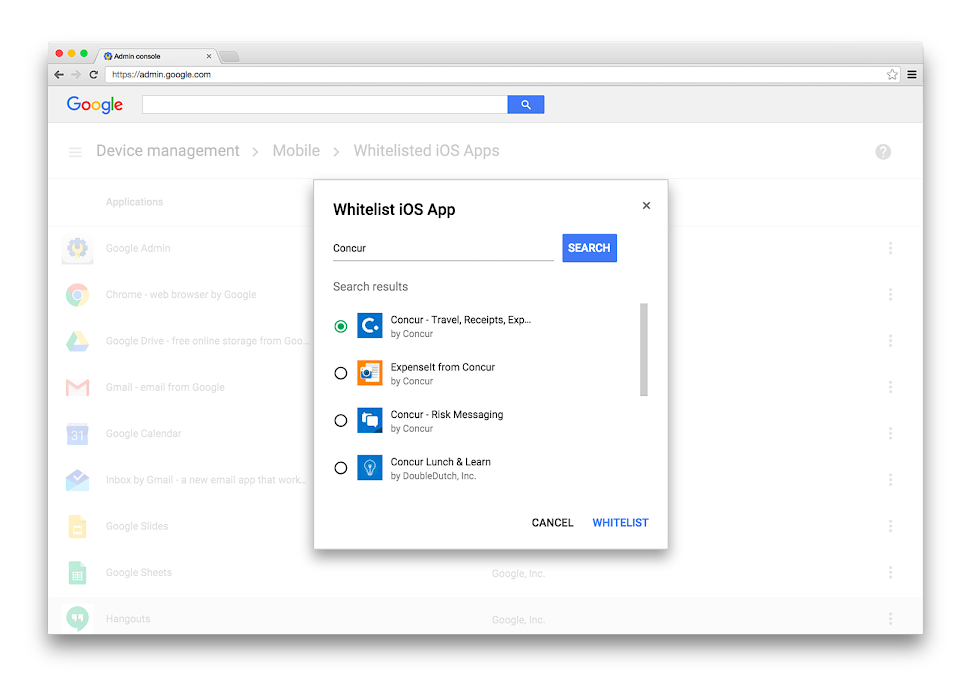
Help your employees find the work apps they need by distributing business applications from the Admin console on either Google Play or Apple’s App Store. You can also host internal only Android apps in the Play Private Channel.
[/et_pb_toggle][/et_pb_column][/et_pb_row][/et_pb_section][et_pb_section bb_built=”1″ specialty=”off” prev_background_color=”#d9dfe2″ _builder_version=”3.1.1″ inner_shadow=”on” animation_style=”zoom”][et_pb_row _builder_version=”3.1.1″ module_alignment=”center” make_fullwidth=”on”][et_pb_column type=”4_4″][et_pb_cta _builder_version=”3.1.1″ title=”Want to know More about G-suite? Talk to our experts.” button_text=”Talk to Us” header_font=”||on|on|||||” header_text_align=”center” body_text_align=”center” button_alignment=”center” /][et_pb_contact_form _builder_version=”3.1.1″ success_message=”Thank you for contacting us, Our experts will get in touch with you shortly.” animation_style=”bounce” text_orientation=”center” max_width=”60%” max_width_tablet=”68%” max_width_phone=”100%” max_width_last_edited=”on|phone” module_alignment=”center”][et_pb_contact_field field_title=”First Name” field_type=”input” field_id=”FirstName” required_mark=”on” fullwidth_field=”off” _builder_version=”3.1.1″ checkbox_checked=”off” checkbox_options=”%91{%22value%22:%22Name%22,%22checked%22:0}%93″ radio_options=”%91{%22value%22:%22Name%22,%22checked%22:0}%93″ select_options=”%91{%22value%22:%22Name%22,%22checked%22:0}%93″ min_length=”0″ max_length=”0″ allowed_symbols=”all” conditional_logic=”off” conditional_logic_relation=”off” conditional_logic_rules=”%91{%22field%22:%22email%22,%22condition%22:%22is%22,%22value%22:%22%22}%93″ use_background_color_gradient=”off” background_color_gradient_start=”#2b87da” background_color_gradient_end=”#29c4a9″ background_color_gradient_type=”linear” background_color_gradient_direction=”180deg” background_color_gradient_direction_radial=”center” background_color_gradient_start_position=”0%” background_color_gradient_end_position=”100%” background_color_gradient_overlays_image=”off” parallax=”off” parallax_method=”on” background_size=”cover” background_position=”center” background_repeat=”no-repeat” background_blend=”normal” allow_player_pause=”off” background_video_pause_outside_viewport=”on” form_field_text_shadow_style=”none” box_shadow_style=”none” /][et_pb_contact_field field_title=”Last Name” field_type=”input” field_id=”LastName” required_mark=”on” fullwidth_field=”off” _builder_version=”3.1.1″ checkbox_checked=”off” checkbox_options=”%91{%22value%22:%22Name%22,%22checked%22:0}%93″ radio_options=”%91{%22value%22:%22Name%22,%22checked%22:0}%93″ select_options=”%91{%22value%22:%22Name%22,%22checked%22:0}%93″ min_length=”0″ max_length=”0″ allowed_symbols=”all” conditional_logic=”off” conditional_logic_relation=”off” conditional_logic_rules=”%91{%22field%22:%22email%22,%22condition%22:%22is%22,%22value%22:%22%22}%93″ use_background_color_gradient=”off” background_color_gradient_start=”#2b87da” background_color_gradient_end=”#29c4a9″ background_color_gradient_type=”linear” background_color_gradient_direction=”180deg” background_color_gradient_direction_radial=”center” background_color_gradient_start_position=”0%” background_color_gradient_end_position=”100%” background_color_gradient_overlays_image=”off” parallax=”off” parallax_method=”on” background_size=”cover” background_position=”center” background_repeat=”no-repeat” background_blend=”normal” allow_player_pause=”off” background_video_pause_outside_viewport=”on” form_field_text_shadow_style=”none” box_shadow_style=”none” /][et_pb_contact_field field_title=”Email Address” field_type=”email” field_id=”Email” required_mark=”on” fullwidth_field=”off” _builder_version=”3.1.1″ /][et_pb_contact_field _builder_version=”3.1.1″ field_id=”Industries” field_title=”Industry” field_type=”select” checkbox_checked=”off” checkbox_options=”%91{%22value%22:%22%22,%22checked%22:0}%93″ radio_options=”%91{%22value%22:%22%22,%22checked%22:0}%93″ select_options=”%91{%22value%22:%22Retail%22,%22checked%22:0},{%22value%22:%22Health%22,%22checked%22:0},{%22value%22:%22Education%22,%22checked%22:0},{%22value%22:%22Government%22,%22checked%22:0},{%22value%22:%22Financial Services%22,%22checked%22:0},{%22value%22:%22Manufacturing%22,%22checked%22:0},{%22value%22:%22Others%22,%22checked%22:0}%93″ min_length=”0″ max_length=”0″ allowed_symbols=”all” required_mark=”on” conditional_logic=”on” conditional_logic_relation=”off” conditional_logic_rules=”%91{%22field%22:%22firstname%22,%22condition%22:%22is%22,%22value%22:%22%22}%93″ use_background_color_gradient=”off” background_color_gradient_start=”#2b87da” background_color_gradient_end=”#29c4a9″ background_color_gradient_type=”linear” background_color_gradient_direction=”180deg” background_color_gradient_direction_radial=”center” background_color_gradient_start_position=”0%” background_color_gradient_end_position=”100%” background_color_gradient_overlays_image=”off” parallax=”off” parallax_method=”on” background_size=”cover” background_position=”center” background_repeat=”no-repeat” background_blend=”normal” allow_player_pause=”off” background_video_pause_outside_viewport=”on” fullwidth_field=”off” form_field_text_shadow_style=”none” box_shadow_style=”none” /][et_pb_contact_field _builder_version=”3.1.1″ field_id=”Specify” field_title=”Please Specify” field_type=”input” checkbox_checked=”off” checkbox_options=”%91{%22value%22:%22%22,%22checked%22:0}%93″ radio_options=”%91{%22value%22:%22%22,%22checked%22:0}%93″ select_options=”%91{%22value%22:%22%22,%22checked%22:0}%93″ min_length=”0″ max_length=”0″ allowed_symbols=”all” required_mark=”on” conditional_logic=”on” conditional_logic_relation=”off” conditional_logic_rules=”%91{%22field%22:%22industries%22,%22condition%22:%22is%22,%22value%22:%22Others%22}%93″ use_background_color_gradient=”off” background_color_gradient_start=”#2b87da” background_color_gradient_end=”#29c4a9″ background_color_gradient_type=”linear” background_color_gradient_direction=”180deg” background_color_gradient_direction_radial=”center” background_color_gradient_start_position=”0%” background_color_gradient_end_position=”100%” background_color_gradient_overlays_image=”off” parallax=”off” parallax_method=”on” background_size=”cover” background_position=”center” background_repeat=”no-repeat” background_blend=”normal” allow_player_pause=”off” background_video_pause_outside_viewport=”on” fullwidth_field=”off” form_field_text_shadow_style=”none” box_shadow_style=”none” /][et_pb_contact_field _builder_version=”3.1.1″ field_id=”Employeesize” field_title=”Employee size” field_type=”input” checkbox_checked=”off” checkbox_options=”%91{%22value%22:%22%22,%22checked%22:0}%93″ radio_options=”%91{%22value%22:%22%22,%22checked%22:0}%93″ select_options=”%91{%22value%22:%22%22,%22checked%22:0}%93″ min_length=”0″ max_length=”0″ allowed_symbols=”all” required_mark=”off” conditional_logic=”off” conditional_logic_relation=”off” conditional_logic_rules=”%91{%22field%22:%22firstname%22,%22condition%22:%22is%22,%22value%22:%22%22}%93″ use_background_color_gradient=”off” background_color_gradient_start=”#2b87da” background_color_gradient_end=”#29c4a9″ background_color_gradient_type=”linear” background_color_gradient_direction=”180deg” background_color_gradient_direction_radial=”center” background_color_gradient_start_position=”0%” background_color_gradient_end_position=”100%” background_color_gradient_overlays_image=”off” parallax=”off” parallax_method=”on” background_size=”cover” background_position=”center” background_repeat=”no-repeat” background_blend=”normal” allow_player_pause=”off” background_video_pause_outside_viewport=”on” fullwidth_field=”off” form_field_text_shadow_style=”none” box_shadow_style=”none” /][et_pb_contact_field field_title=”Message” field_type=”text” field_id=”Message” required_mark=”on” fullwidth_field=”on” _builder_version=”3.1.1″ /][/et_pb_contact_form][/et_pb_column][/et_pb_row][/et_pb_section]